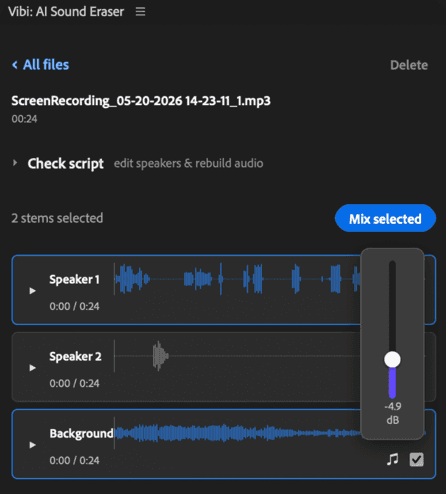
VIBI: AI Sound Eraser is a UXP panel for cleaning up audio inside Premiere Pro. It separates a clip into voice, background, and individual speaker stems, so you can mute a passerby or background noise while keeping the footage. You can edit the timecoded speaker transcript and mix the result back into your sequence as a .wav file. The developer’s site lists the Premiere Pro panel as live for Premiere Pro 26+.
Separate speakers and background audio
Load a local file or choose a clip from the Project panel or Timeline. After separation, VIBI gives you voice, background, and per-speaker stems to mix. A waveform preview helps confirm the source clip before you work on it.
Edit the transcript and mix
The panel pairs a timecoded transcript with the separated audio. Rename or reassign speakers, then regenerate the audio to match those edits. Per-stem controls let you switch stems on or off and adjust their levels with dB faders. Export the finished mix as a .wav to the Premiere Pro project or Timeline.
This workflow may suit interview, podcast, documentary, or vlog footage where a noise or an unwanted voice is mixed into a recording. It keeps the sound cleanup in Premiere Pro, with the video footage preserved.
Compatibility and availability
The catalog listing identifies version 1.0.4 and compatibility with Premiere Pro 26.0.0 or newer. VIBI’s site says its iOS and Android apps are in store review, though it also links to an iOS App Store page, so current iOS availability is unclear. The site says beta payments are not live yet and VIBI is free to try. Check the developer’s site for current availability and terms.