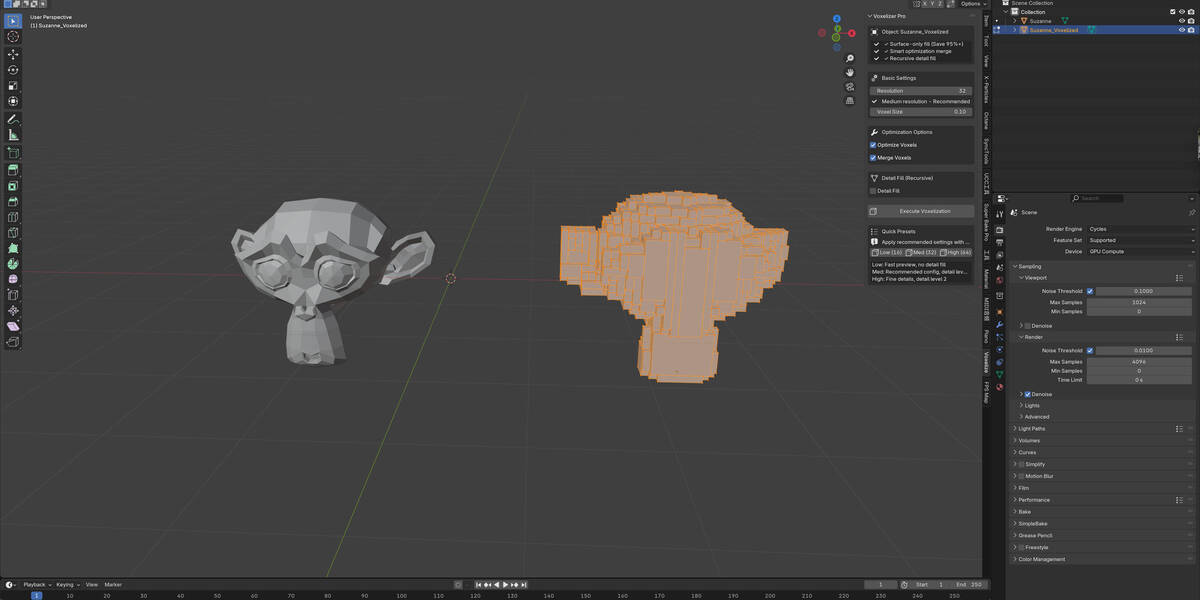
Voxelizer Pro is a Blender add-on for mesh voxelization. It converts a mesh object into voxel blocks using surface-only generation, adjacent-block merging and recursive detail fill. The product is aimed at voxel and low-poly game assets, stylized renders, animation and retro-inspired scenes. Its Superhive listing describes the controls and requirements.
How the voxelization works
Instead of filling the model's entire volume, Voxelizer Pro generates voxels on its surface. The developer says this can reduce polygon count and memory use. Multi-axis greedy meshing combines adjacent voxels into larger blocks, and BVH-accelerated distance queries support the detail-fill system. The output still depends on the input mesh and chosen settings.
The listing advertises 95%+ memory savings and up to 10x fewer objects than naive voxelization. It does not specify the meshes, hardware or measurement conditions behind those figures, so treat them as the developer's comparisons rather than results guaranteed for every model.
Resolution and detail settings
Resolution ranges from 5 to 200 units along the model's longest axis. The presets are Low (16) for previews, Medium (32), which the listing recommends for most projects, and High (64) for maximum detail with level-2 recursive filling. Real-time feedback is intended to help balance detail and performance.
Recursive detail fill can add voxels at half, quarter or eighth the base size where needed. Subdivision is configurable up to three levels deep. The High preset uses level 2. This lets the tool add finer blocks in areas that need detail without applying that smaller size across the whole model.
Typical workflow
- Select a mesh object in Blender.
- Choose a preset or adjust resolution and optimization settings in the 3D View sidebar.
- Click Execute Voxelization, then inspect the result and adjust settings if needed.
Requirements and version details
The product description says Blender 3.0 or higher, and lists no external dependencies. However, the listing's Blender Version field shows 3.6 to 5.2, while a separate FAQ entry says 3.0 to 5.1. Those version details conflict, so check the current product listing before installing.
Who it suits
Its surface-focused generation and adjustable detail settings are relevant when you want to control how much of a mesh becomes voxel geometry.