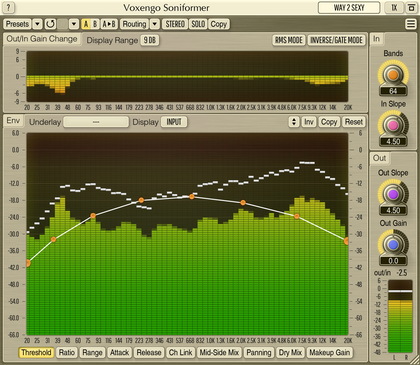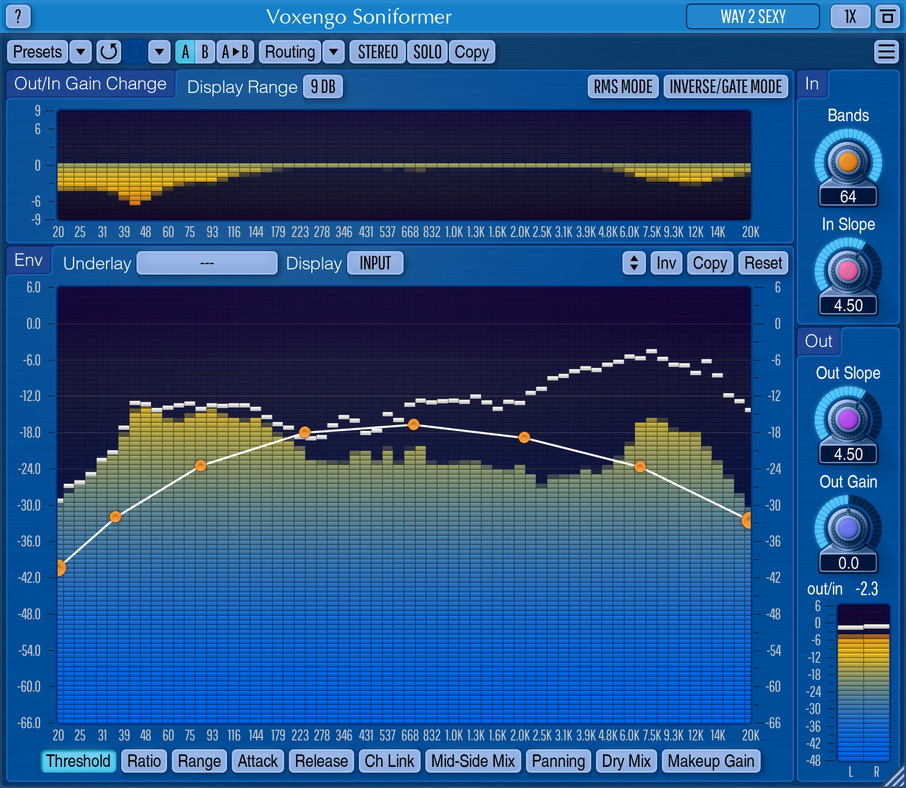
Voxengo Soniformer is a spectral dynamics plugin for mastering and sound restoration. It divides audio into up to 64 frequency bands, so you can shape dynamics in selected ranges instead of applying one setting across the whole signal. Its editable envelopes let threshold, ratio, range, attack, release and makeup gain vary across frequency.
Shape dynamics by frequency
To compress low frequencies while leaving higher frequencies alone: set the ratio above 1:1 in the low range and leave it at 1:1 above that range. Ratios below 1:1 provide expansion. Each envelope can be edited with control points across the audible frequency range.
The analyzer can display input or output spectra, stereo balance and stereo correlation. A separate gain-change meter shows the processing effect. For resonance work, the narrow-band sweep lets you listen to a selected frequency range from the envelope surface; use Ctrl-click on Windows or Command-click on macOS, then adjust the relevant envelopes.
Inverse/Gate Mode reverses the dynamics response when ratios are above 1:1, affecting signal below the threshold so quieter sounds become quieter. Attack and Release settings switch roles in this mode; use long Attack and short Release settings for gating.
Mastering and stereo work
Start with the Default preset. During playback, adjust In Slope until the input spectrum looks mostly horizontal; this makes the Threshold envelope easier to draw. Place Threshold between the average and peak levels, then lower it until the processing is audible. Refine Attack, Release and Ratio while listening. Presets are starting points: adjust Threshold for the mix's input level, and adjust output gain if needed. For mastering, place Soniformer before the main equalizer. If the source needs tonal correction first, put an EQ before Soniformer.
Soniformer also provides multiband panning, mid/side processing, channel grouping and internal routing for stereo and multichannel work, including 5.1 and 7.1 formats. Its stereo-width control uses mid/side processing by band. Moderate width adjustments remain mono-compatible, and the correlation display can help check the result. Reducing channel linking may limit stereo-field narrowing under heavier compression or expansion, especially in frequency regions where stereo correlation is near zero.
Compatibility and trial limits
Mac downloads are available in AU, AAX and VST3; Windows downloads are available in VST, VST3 and AAX. The host must support the matching plugin format. The feature page lists Windows XP, Vista, 7, 8, 10 and later versions, and macOS 10.12 and later, unless a version is announced as unsupported. The Version 3.16 user guide lists macOS 10.11 and later unless announced otherwise. These documents give different macOS minimums and do not establish which minimum currently applies. The feature page also names native Apple Silicon and support for macOS Sonoma, Sequoia and Tahoe. Minimum hardware is a 2.5 GHz dual-core or faster processor and 4 GB of RAM.
Soniformer has 14 ms of compensated processing latency, which may matter for live monitoring. Its relatively CPU-intensive processing may also matter in a dense session. In the trial, output is muted briefly every 45 seconds. Demo authorization uses a text product key and does not require a dongle, challenge-response or a connection to Voxengo's website.