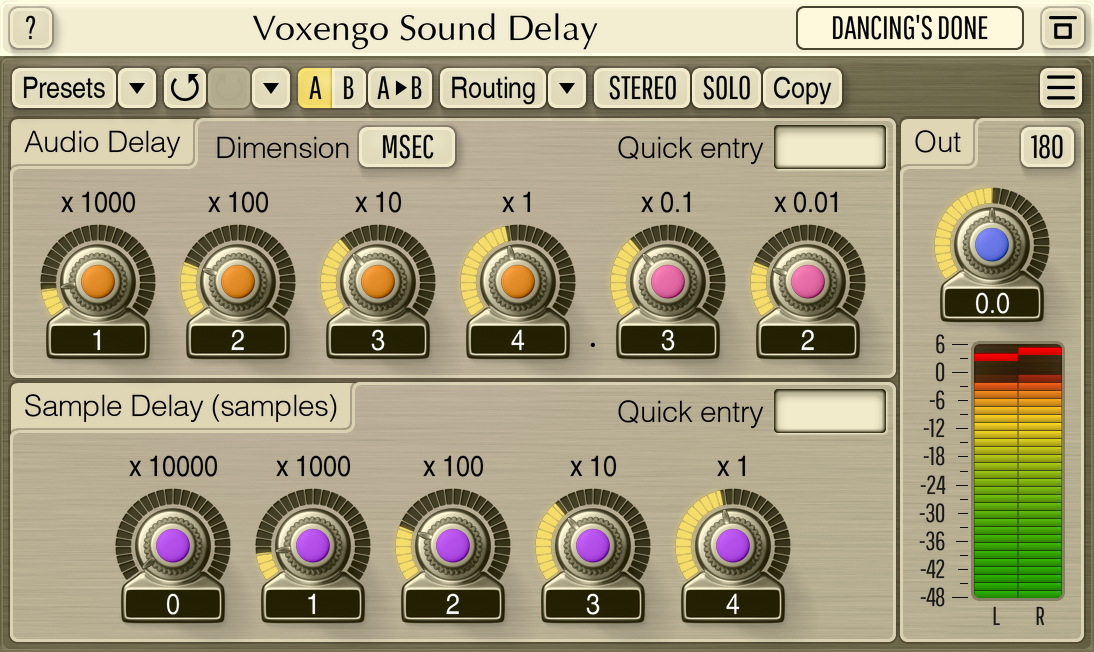
Voxengo Sound Delay is an auxiliary plug-in for precise signal timing. Use it to align tracks or multi-microphone recordings, delay one stereo channel for a pseudo-stereo effect, or adjust mid and side channels independently. It processes stereo and multichannel signals.
Set timing in milliseconds, meters, feet, or samples
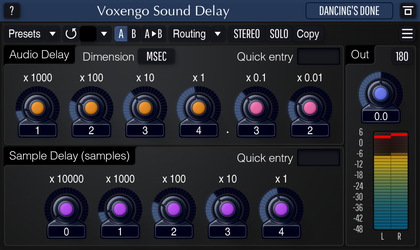
The plug-in has separate Audio Delay and Sample Delay controls. Set an offset in milliseconds, meters, or feet with Audio Delay, then use Sample Delay for sample-accurate adjustment. The Quick entry field accepts the delay as a single number. For meter and feet values, the conversion assumes a sound speed of 340.29 meters per second. The two settings add together, up to a maximum total delay of 12 seconds.
For a pseudo-stereo effect, delay one channel relative to the other. For a multichannel or mid/side task, Sound Delay provides internal channel routing and channel grouping; its built-in mid/side encoding and decoding lets you set mid and side delay independently. The user guide describes the controls and their limits.
What it does and does not do
The guide describes Sound Delay as a basic signal delay with no feedback or modulation. It fits timing correction and channel placement where a predictable offset is needed. An output level control and meter are provided, along with a switch that inverts output phase by 180 degrees. Presets, undo and redo, and A/B comparisons help manage settings.
Compatibility and installation
Voxengo lists AudioUnit, AAX, VST, and VST3 host support. Its setup page specifies macOS 10.12 or later on 64-bit Intel or Apple Silicon Macs, and Windows packages for 32-bit and 64-bit audio hosts. The listed system requirement is a 2.5 GHz dual-core or faster processor with at least 4 GB of RAM. Sound Delay runs inside a compatible audio application; it is not a standalone program. Logic Pro and GarageBand users need the AudioUnit version. After installing, rescan plug-ins in the host or restart it. See Voxengo's installation instructions for the platform-specific steps. Voxengo lists Sound Delay as free, and says an account registration is not required for installation.