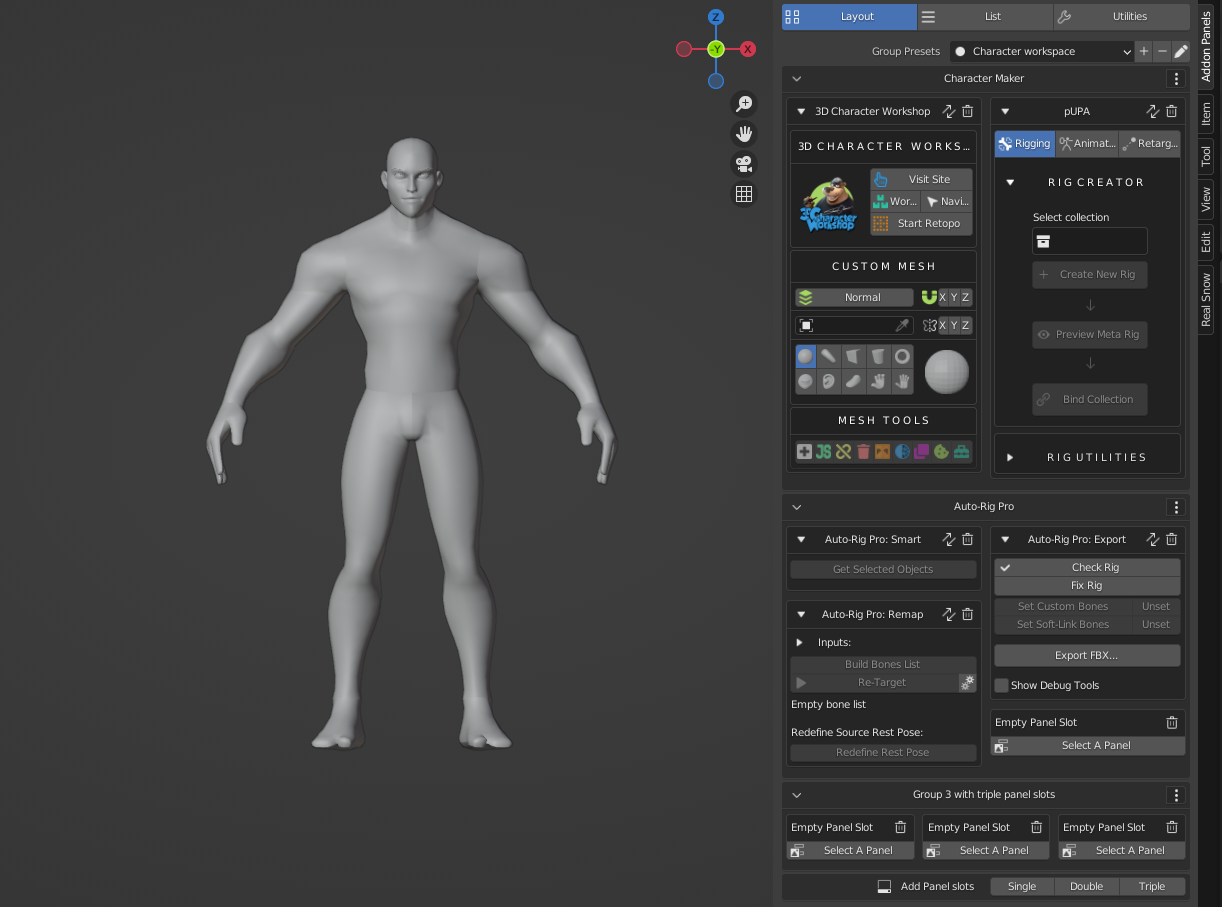
Addonpanel Manager is a Blender add-on for organizing the N-Panel beside the 3D Viewport. It lets you view and group several add-on panels, then reorder them to suit your workflow.
Organize panels and save layouts
Layout View shows multiple panels, while List View provides another way to browse them. The Panel Selector can refresh the list of available add-ons, and the add-on tries to load panels automatically. Save Layout stores a panel arrangement as a preset; Load Layout switches to a saved setup. An Addon Manager utility also provides access to installing or uninstalling add-ons beside the viewport.
Install and use
The product listing gives these installation steps: in Blender, choose Edit > Preferences > Addons > Install, select the add-on file, and enable AddonPanels Manager. The listing says to wait a few seconds for the panels to load. You can then choose a view, arrange panels, and save a layout preset if you use different setups for different tasks.
Compatibility and availability
Development is paused, according to the product listing, which directs users to its Discord channel for bug reports and suggestions. The listing’s compatibility details differ: its banner says Blender 4.3 is supported, its Details section lists Blender 4.2–4.3, and its description says Blender 2.9 and later. The listing does not make clear whether support extends beyond Blender 4.3. Check the current listing and test compatibility before relying on the add-on. AnyPlugins lists it as free; the Superhive Details section identifies a GPL license, so confirm current availability and terms there before downloading.