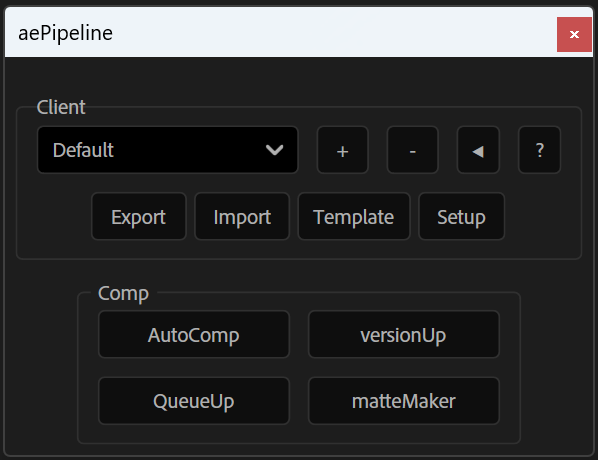
aePipeline automates recurring VFX shot setup in Adobe After Effects. It lets a team save conventions for each client, switch between client setups from a dropdown, and build, version, queue, or matte shots through four controls.
Build a shot stack from footage
AutoComp creates a working preslate, a final comp named with a version such as _comp_v001, and an optional preview comp such as _comp_lut_v001. The generated stack can include a reference, color setup, and burn-ins. If the client setup has slates turned off, AutoComp creates a single flat final comp instead of a preslate and final-comp pair. A preview comp can also be toggled per client.
Client setup holds choices such as the slate and preview options, output folder, handles, start frame, company name, CDL folder, template folders, AutoComp resolutions, and scaling. This suits compositors who repeat a show's naming and setup rules across many shots or switch among jobs with different conventions.
Version, render, and matte operations
- versionUp advances comps to the next version and prompts for a slate note. An optional backup saves the entire comp stack.
- QueueUp routes comps to the render queue with output settings, module, path, and filename chosen for each comp type. The product walkthrough also demonstrates a filename safety check.
- matteMaker creates frame-accurate matte comps from a preslate and aligns them to the live version and timing.
Color rules and setup details
The color pipeline uses the bundled, free and open-source fnord CDL plugin. Its CDL.aex file must be copied to After Effects' Mediacore folder, followed by restarting After Effects. Client conditions can apply different choices to matching shots; the walkthrough shows a night-shot LUT rule and condition options including text matching, width, and aspect ratio.
A Source TC option uses the plate's embedded EXR timecode for each comp's start timecode. Filename numbering remains based on the configured Start Frame through the EXR output module's Starting # setting.
Compatibility and license
The product page lists compatibility with After Effects 2023, 2024, 2025, and 2026. The posted EULA grants a license to install and use one copy on one computer at a time. It permits one archival copy on a storage medium other than a hard drive, for reinstallation. Multiple copies or users require an appropriate license for each.