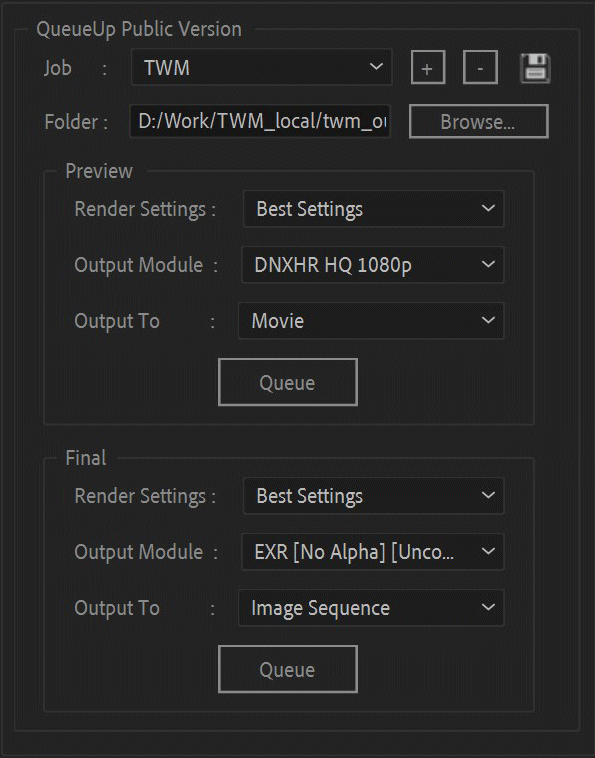
QueueUp is an After Effects script for jobs with separate preview and final deliverables. It saves an output folder and render settings for each job, so you can switch between jobs without entering those details again.
Set up preview and final settings for each job
The interface is divided into Job & Folder, Preview Settings, and Final Settings. Create a job with the [+] button, choose its output folder, then select preview and final settings from templates you have already made. Click Save to keep the job's settings; the product instructions warn that the settings will not save otherwise.
When you are ready to render, select the compositions you want and use the Queue button for either preview or final settings.
Keep preview and final renders in separate destinations
Preview renders go directly into the output folder assigned to the job. Final renders go into a /finals subfolder. Before queueing, check the active job, its output folder, the settings you want, and the selected compositions.
Version and compatibility notes
The aescripts listing shows version 1.1.0, dated June 3, 2026, with minor bug fixes. Its compatibility section lists After Effects 2025, 2024, 2023, 2022, and 2021. A separate version-history note says 1.0.9 works in After Effects 2026. If you need to confirm support for a particular release, check the QueueUp product page on aescripts or ask the author.
Check the product listing for current trial, pricing, and release details before installing.