Santa's Little Credit Helper is an After Effects tool for creating and revising card-style credits for web, television and film projects. Its Google Docs templates let a production team prepare text and timing details, then load the credits into After Effects without retyping them.
Prepare credit text with a team
This workflow may help when production staff gather the credits and an editor assembles the final sequence.
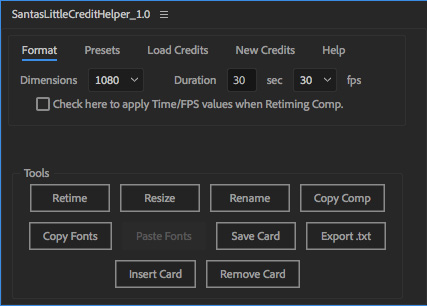
Manage cards from one control point
A single Null controls layout, scale, spacing, tracking, shadows and centering across the cards. Multiple controls can switch between larger full-screen cards and smaller banner cards within one composition.
You can edit, add or remove names, move them between columns and cards, and insert or remove cards. The listing says the layout stays aligned as you make changes, and cards retime automatically when inserted or removed.
Adjust timing and style
Set timing for the whole sequence or for individual cards, using absolute or weighted lengths. A one-click recalculation retimes the credits. To change their appearance, copy and paste fonts, color and stroke, or save and load presets to compare styles and reuse approved looks. The product listing says changes update instantly and playback has no delay.
Reformat and hand off
Reformat tools switch a composition among HD 720, HD 1080, UHD and 4K. You can export credit changes to a tab-delimited .txt file for checking or archiving. The completed credit compositions are self-contained, so they can be passed to someone else for rendering without Santa's Little Credit Helper installed on that machine.
Check compatibility before using it
The product listing gives these compatible versions: After Effects 2020, CC 2019, CC 2018, CC 2017, CC 2015.3, CC 2015 and CC 2014. Its version history lists 1.5, dated March 15, 2020, as the latest entry shown. Support for later After Effects versions is not confirmed there. Check the official product listing or contact the developer about compatibility with your installation.