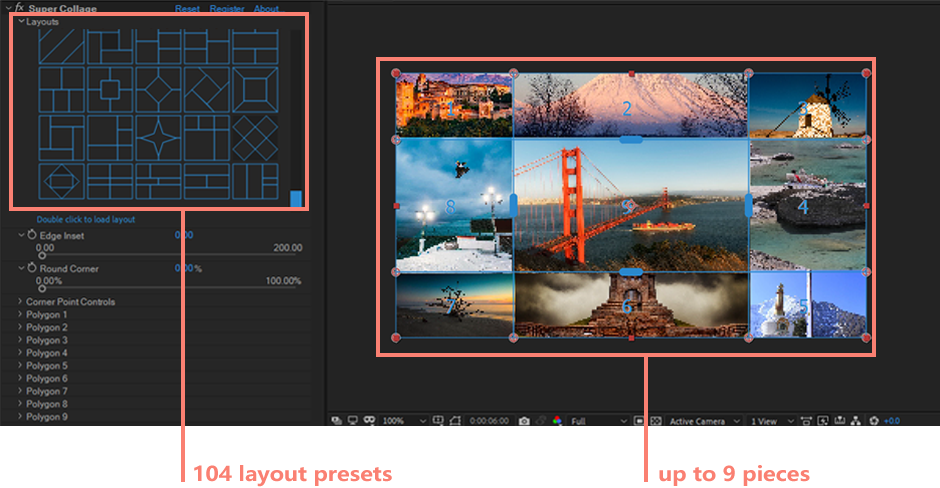
Super Collage is an After Effects plugin by Zhiqiang Li for arranging photos and video clips in collage layouts. It includes 104 presets for compositions with up to nine pieces. After choosing a layout, you can reshape its pieces in the composition viewer, adjust gaps and corner roundness, and control how each image or clip fits.
Choose a preset and reshape it
Super Collage previews its layout presets in the effect control panel. Once you choose one, adjust the collage directly in the composition viewer: move corner points or slide shape edges to change the pieces. Corner roundness and gaps between shapes have their own controls.
These shape edits can be animated, so a preset can become a changing collage within an After Effects composition. This suits projects where the arrangement needs to shift over time or match a particular design.
Adjust the photos and clips
As you change the collage shapes, their contents adjust dynamically, so most of the time you do not need to manage them separately. When a piece needs different framing, controls let you adjust its content position and scale manually.
Super Collage suits After Effects projects where you need to adjust collage geometry, spacing, or media framing.
Check compatibility before buying
The product listing names After Effects 2020, CC 2019, CC 2018, CC 2017, CC 2015.3, CC 2015, CC 2014, and CC. It also states that Super Collage is not compatible with Apple Silicon chips. Check the Super Collage product listing against your After Effects and Mac setup before purchasing.
The visible version history lists version 1.0.1, dated May 11, 2020. Its notes include a layer-size fix for 16-bit color mode and a crash fix for certain MacBook Pro models. The listing’s version history does not establish current support details, so check the product page for updates.