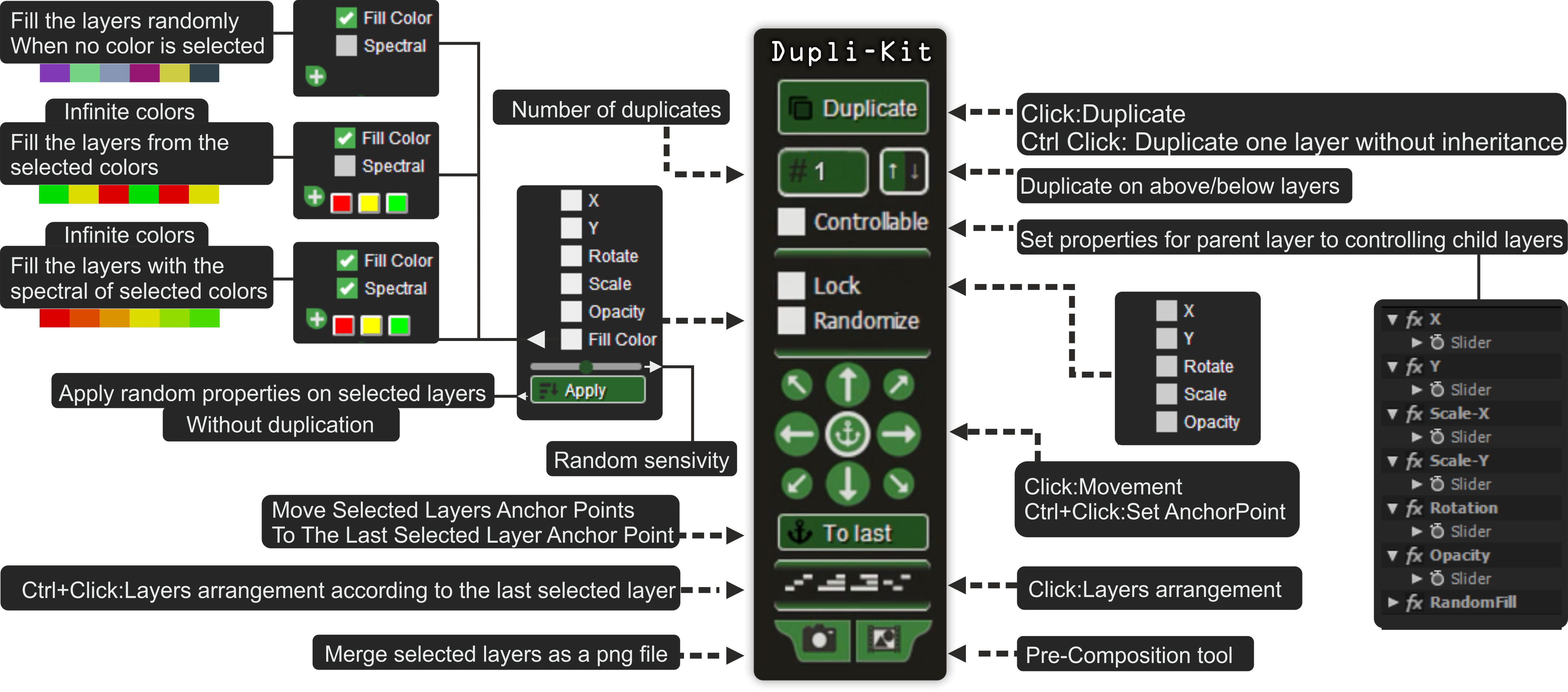
Dupli-Kit by MotionCodes is a layer duplication tool for Adobe After Effects. Select one or more layers and duplicate them to build a pattern, then adjust offsets and duplication count. It also has controls for transform randomization, layer coloring, arrangement, and anchor points. It suits motion graphics work that uses repeated elements with controlled variation.
Build and adjust a layer pattern
The first duplication places copies in the same position as the selected layers. Change the properties and duplication count, then run Duplicate again to create the pattern. You can edit the spacing later by selecting the parent layer and changing the offset values in the Effects panel.
Vary and arrange layers
The randomize controls assign values within a range to selected layers' transform properties. For color, Dupli-Kit can apply random fills, choose randomly from a set of selected colors, or arrange selected colors spectrally.
Arrangement controls either sequence selected layers across the selected work area or shift them randomly. Ctrl-clicking an arrangement button bases the order on the last selected layer, with layers closer to that target appearing first.
Manage anchor points
The anchor point controls can move anchor points around layer edges while keeping the layers in the same positions in the composition. The controls move the layer objects by default; hold Control to adjust their anchor points instead. You can also move selected layers' anchor points toward a specific layer. The To Last button transfers the last selected layer's anchor point to all selected layers.
Compatibility and licensing
The compatibility list names After Effects CC 2015 and CC 2015.3, CC 2017 through CC 2019, and releases 2020 through 2026. The listed EULA grants use of one copy; its one archival copy must be stored on a medium other than a hard drive and may be used only for reinstallation. Using or installing copies on multiple computers or for multiple users requires appropriate licensing for each copy and user.