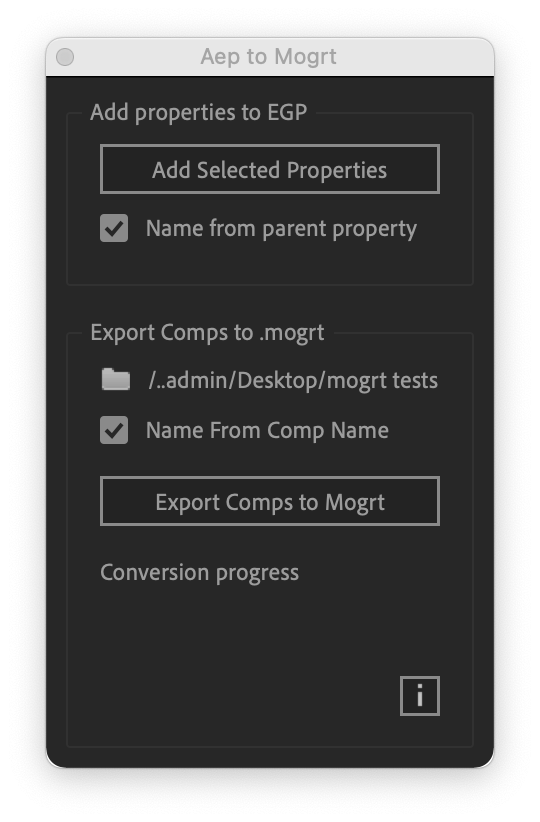
Aep to Mogrt Pro helps After Effects users expose composition controls in the Essential Graphics Panel and export compositions as Motion Graphics Templates (MOGRTs). It fits workflows where you prepare reusable templates or need to process multiple compositions.
What Pro adds
The free version can add properties to Essential Graphics, name a property from its parent, and export compositions to MOGRT. Pro includes those features and adds:
- Adding properties to the active or selected composition, including media and pre-compositions.
- Adding Media Replacement controls.
- Adding properties in one action from a Controller layer or another selected layer.
- Batch mode for exporting multiple compositions.
- Options to enable font style and size customization and collapse groups in exported templates.
- Keywords and image or video previews in MOGRT files.
A typical export workflow
- Choose the active or selected composition and add the properties editors should be able to change in Essential Graphics. Add controls individually or collect them from a Controller layer.
- Set up Media Replacement and the font customization and group options needed for the template.
- Add keywords and image or video previews, then export one or more compositions as MOGRT files.
Version 2.1.3 (Apr 30, 2026) added an option to apply Classic 3D handling to compositions during MOGRT export when selected. That version also warns when selected compositions exceed 15 seconds because preview export may take longer.
Compatibility and licensing
Compatible After Effects releases are 2020-2026 and CC 2017, CC 2018, and CC 2019. AEVIEWER can preview and import MOGRT files in After Effects and Premiere Pro.
The purchase listing offers a license-type selector. The product EULA, updated Oct 21, 2025, grants one copy and restricts installation or use across multiple computers, shared-application systems, and multi-user configurations; multiple-copy use requires an appropriate agreement for each user and copy. The License Type FAQ, dated Nov 5, 2026, says a Single User License normally allows installation on up to two user accounts or computers when they are not used at the same time; for more than two, it calls for additional Single User licenses or suggests considering a Floating License. Product terms may differ. A Floating License allows installation on multiple computers on the same network, permits one user per license at a time, and requires the Floating License Server; remote users need VPN access to that network. The product listing displays a "Floating License Server Required" notice naming Aep to Mogrt Pro, but does not say whether it applies to every license selection. Check the selected terms before planning team use.