What AE Banner Bridge exports
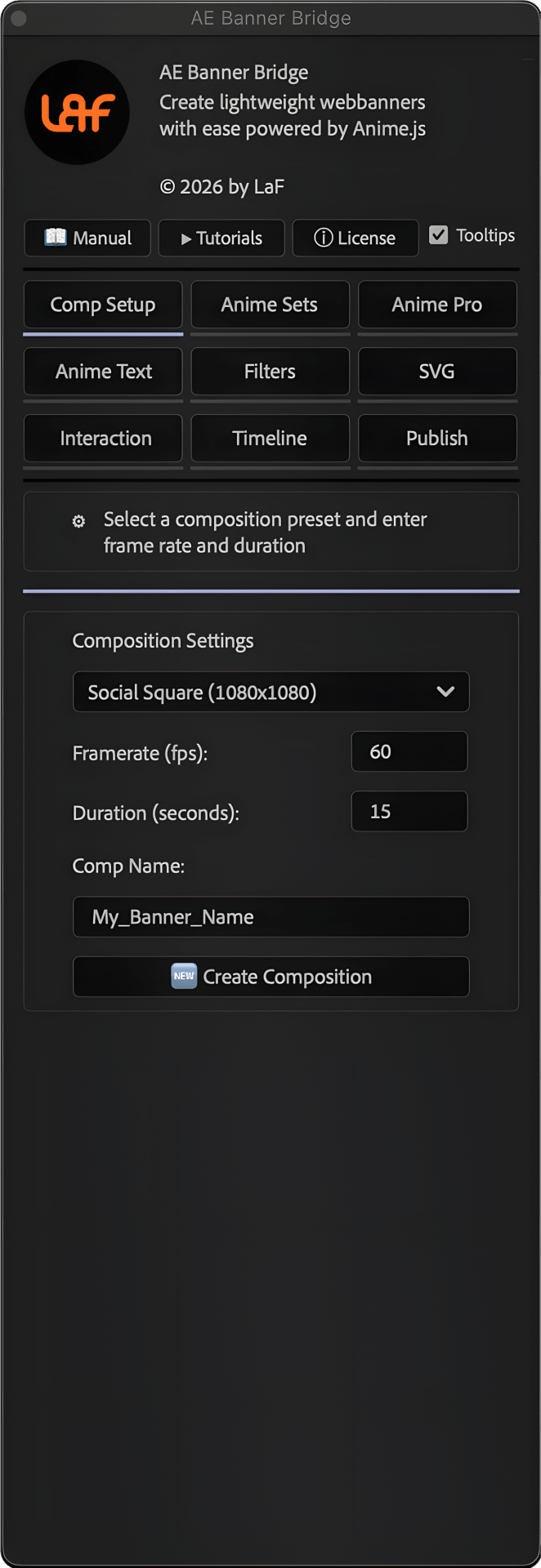
AE Banner Bridge is an After Effects script that lets motion designers export compositions as animated HTML5 banners. It creates a folder containing HTML, CSS, JavaScript and image files. You work with the familiar After Effects timeline, then configure the banner through the script's tabs.
Set up timing, easing and text
In Comp Setup, choose a banner format preset and set the frame rate, duration and composition name. Anime Sets applies Natural, Impact or Overshoot easing presets to keyframes. Anime Pro provides controls for custom cubic Bézier curves, spring or elastic physics, and stepped timing.
The Anime Text tab animates DOM text by letter, word or line, with in and out timing markers and textbox clipping. The exported text does not have to be rendered to a canvas or converted to vector shapes.
Prepare effects, assets and interactions
The CSS Filters tab applies browser-native effects, including drop shadow, fast blur, gradient ramp and hue or saturation adjustments. The listing also documents native After Effects masks, track mattes and most blending modes. The SVG tab converts Illustrator files, text layers or shape layers into browser-ready SVG.
For interactive banners, assign IDs, hover reactions, ClickTags and destination URLs. You can make the whole banner clickable and set links to open in a new tab. Timeline markers control loop counts and stop points, and a neutral layer can hold developer annotations.
Publish and check compatibility
The Publish tab lets you load Anime.js from a CDN or bundle it locally, enable responsive scaling, add a border, embed fonts and run an initial-load size check. Batch Mode exports multiple compositions. The product listing names After Effects CC 2019 and versions 2020 through 2026 as compatible.
Check the support details for any particular composition feature your banner depends on.
License setup
The product EULA permits one copy and prohibits installing or using it on more than one computer at a time; multiple users or copies require appropriate licenses. aescripts' general license guidance says Single User licenses do not require the Floating License Server and may be installed on up to two computers if they are not used simultaneously, while Floating and Render Only licenses require the server. The product page's checkout notice also says the server is required. Because the general guidance and product EULA state different computer limits, confirm the license type selected for AE Banner Bridge and the applicable product terms before purchase.