Effect Remover Pro is an offline After Effects panel for searching and managing effects. It is aimed at motion designers and video editors working with effect-heavy compositions, where locating an effect or toggling several effects by hand can slow a cleanup or comparison.
Find and control effects
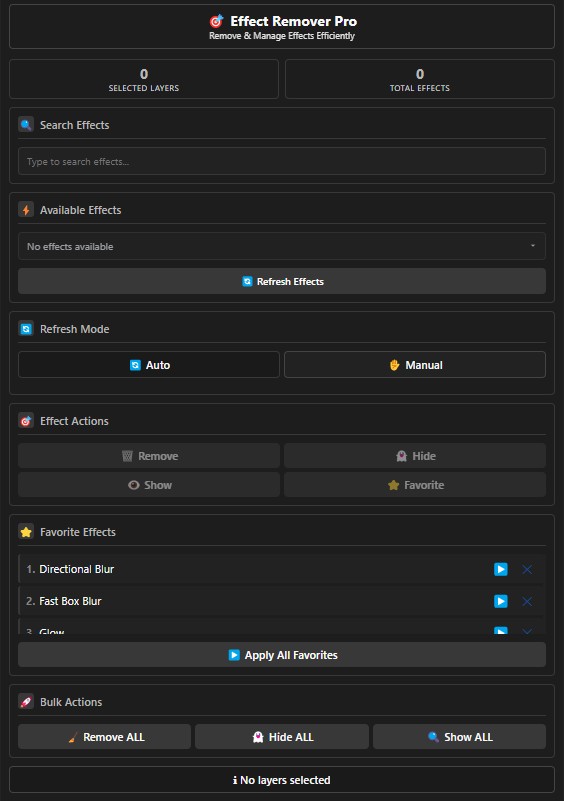
Select layers and use real-time search to find effects applied to them. Hide an effect to compare the composition with it disabled, show it to re-enable it, or remove it from the layer. The panel also supports automatic and manual refresh.
Clean up a composition and reuse effects
Scan the entire composition to identify its used effects; use the results to build a Favorites list. You can also save commonly used effects to Favorites. They persist between sessions and can be applied to selected layers.
Bulk controls can remove every effect after confirmation, hide all effects for debugging, or show them all again. Actions support Undo with Ctrl+Z or Cmd+Z, so you can reverse a cleanup if needed.
Compatibility and license choice
The listing names After Effects 2024, 2025, and 2026 as compatible versions. aescripts describes the extension as fully offline, and the product page lists a free trial.
The product page has a License Type selector. The License Type FAQ, dated Nov. 5, 2026, says a Single User License can cover up to two computers when they are not used at the same time, unless a product says otherwise. Effect Remover Pro's EULA, updated Oct. 21, 2025, licenses one copy and bars installation on more than one computer at a time; the EULA sets a stricter product-specific limit than the FAQ's general allowance. A Floating License requires the aescripts Floating License Server on the same network, allows one user per license at a time, and requires VPN access for remote work.