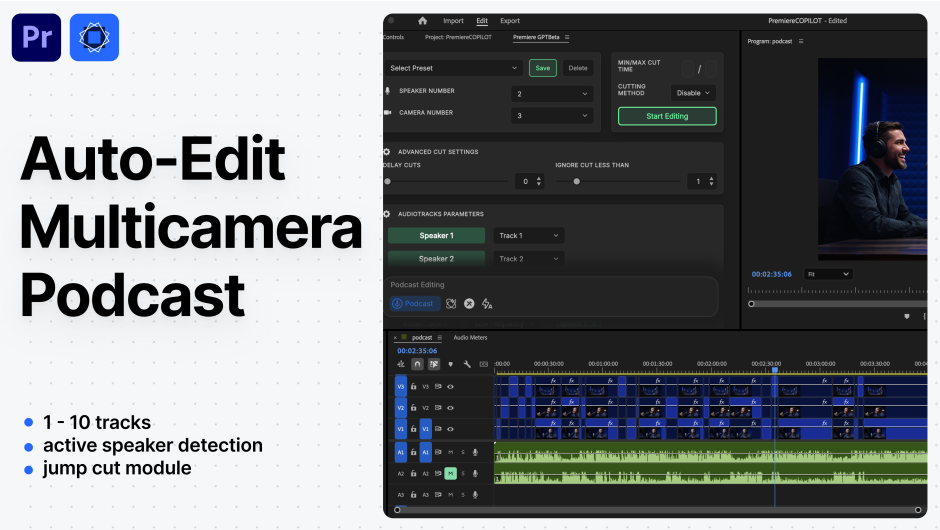
PremiereGPT - Podcast Bundle is a Premiere Pro toolset for podcast editors working with multi-camera footage. It combines active-speaker camera cuts with a Jump Cuts tool for removing silence. The generated timeline uses standard Premiere Pro cuts, which editors can fine-tune afterward.
Build speaker-based multicam edits
The active-speaker tool analyzes audio waveforms and lets you assign each speaker to a camera angle. You can set rules for jump cuts and wide shots; the product listing says the tool switches to a group view when multiple people speak. After you select “Create Cuts,” PremiereGPT builds the multicam timeline for review and adjustment.
Remove silence and adjust pacing
The bundle’s Jump Cuts tool automates silence removal. Its controls include a live preview and a minimum shot duration setting, so you can review the pacing before creating cuts. The product page’s tutorial chapters also cover saving presets for both the podcast and Jump Cuts tools.
How the workflow fits together
- Import footage into Premiere Pro and let the active-speaker detection scan the audio tracks.
- Assign speakers to their camera angles, then choose rules for jump cuts and wide shots.
- Create the cuts, review the resulting timeline, and make any edits the automatic pass missed.
This setup may suit editors who regularly assemble multi-camera podcast recordings and want help with the first edit while keeping the timeline editable in Premiere Pro.
Compatibility and trial options
The listing names Premiere Pro 2026, 2025, 2024, 2023, 2022, 2021, and CC 2017 as compatible versions. It lists separate trial packages for Windows, macOS ARM, and macOS Intel. The supplied listing does not specify minimum operating-system requirements, so check its current details against your computer and Premiere Pro installation.
When the listing was retrieved on November 23, 2026, it showed a price of $59, a 25% discount at checkout, and no monthly charges. It also offered a free trial and demo. Prices and offers can change; see the current product listing for the latest details.