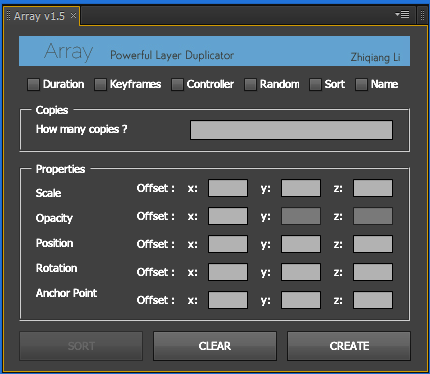
Array is an After Effects script for duplicating layers and adjusting basic properties across selected layers. To create a repeated arrangement, enter the number of copies and the offsets, then click Create. You can also offset selected layer properties without making copies.
Copy and adjustment controls
Version 1.5 adds randomization for basic properties on selected layers or copies, renaming for generated copies, and checks for entered values. These controls help when repeated layers need varied properties or distinct names.
Run it as a panel or floating window
Keep the script file and its Array_Resources folder together. Place both in After Effects' Scripts/ScriptUI Panels folder and launch Array from the Window menu to use it as a panel. Alternatively, place them in the Scripts folder and launch it from File > Scripts. In that setup, Array opens in a floating window with maximize and minimize buttons; the window resizes when you turn its UI group on or off.
Compatibility and licensing
The product page lists After Effects CS4, CS5, CS5.5, CS6, CC, CC 2014, and CC 2015. It does not list later releases, so compatibility with newer versions is unconfirmed.
The store currently lists Array as Name Your Own Price with $19.99 suggested. Individual users may pay any amount; businesses and teams must pay the suggested amount for a valid license. Under the listed single-user license, one user can register it on up to two machines but cannot run it on both at the same time.