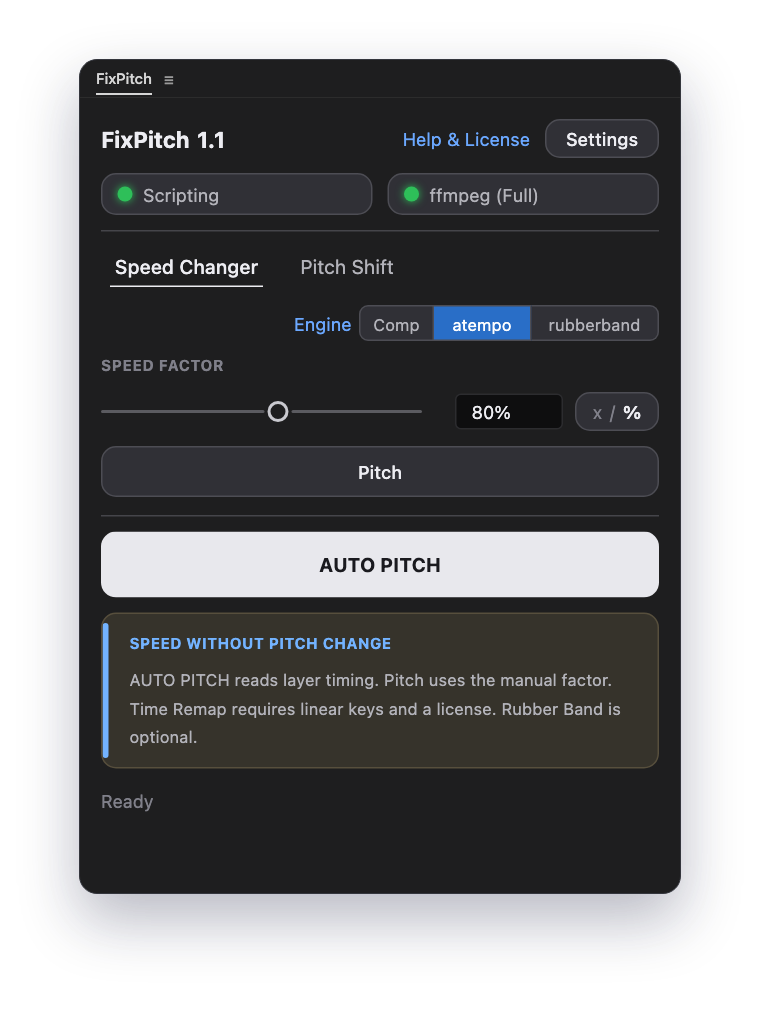
FixPitch is an After Effects script from Lindev for two audio jobs: correcting pitch changes caused by speed edits, and shifting pitch while keeping a clip's duration and timing. Its Auto Pitch control reads a layer's Time Stretch or Time Remap settings and calculates the correction.
Correct pitch after changing speed
When processing audio or video footage, or audio inside a precomp, the atempo and Rubber Band engines render corrected audio to a new layer and mute the original. You can compare the result with the source layer. Time Remap speed ramps are corrected section by section and joined into one track; the keyframes must be linear and playback must move forward. For manual speed changes, enter a multiplier such as ×2 or a Stretch value such as 50%.
Choose an engine for the clip
atempo is the default and works with any FFmpeg build. Its supported speed range is ×0.125 to ×8, and the product page recommends it for dialogue, voiceover and everyday speed changes. Rubber Band uses a different time-stretching algorithm and is an alternative to compare when atempo sounds rough, especially with music or larger speed changes. It needs a full FFmpeg build with Rubber Band and supports the same stated speed range.
Comp mode works on a precomp without FFmpeg, rendering or new audio files. It applies the opposite Time Stretch to audio layers inside the precomp, which suits short effects such as clicks, whooshes and UI sounds that need to stay in sync with retimed picture. It is unsuitable for music, voiceover and long ambience because longer audio can drift out of sync as the picture changes length. Comp mode supports forward Time Stretch only, not Time Remap or reverse playback. It edits the precomp itself, so the change appears wherever that precomp is used.
Shift pitch without changing duration
The separate Pitch Shift tab moves audio across a range of 24 semitones in either direction while leaving its length and timing unchanged. It creates a copy that retains the layer's Time Stretch, Time Remap, levels and effects, then mutes the original. The Rubber Band engine can preserve voice formants during this shift. At tempo works with any FFmpeg build; Rubber Band requires the full build.
Setup and compatibility
FixPitch runs on Windows and macOS with After Effects CC 2019 and versions 2020 through 2027. Install FFmpeg separately to use atempo, Rubber Band or Pitch Shift; Comp mode needs no additional tool. For file-rendering modes, After Effects must allow scripts to write files. The status lights indicate whether FFmpeg is missing, a base build or a full build, and whether script file access is enabled. FixPitch has a free trial. Its EULA grants use of one copy on one computer at a time; additional copies or users require the appropriate license.