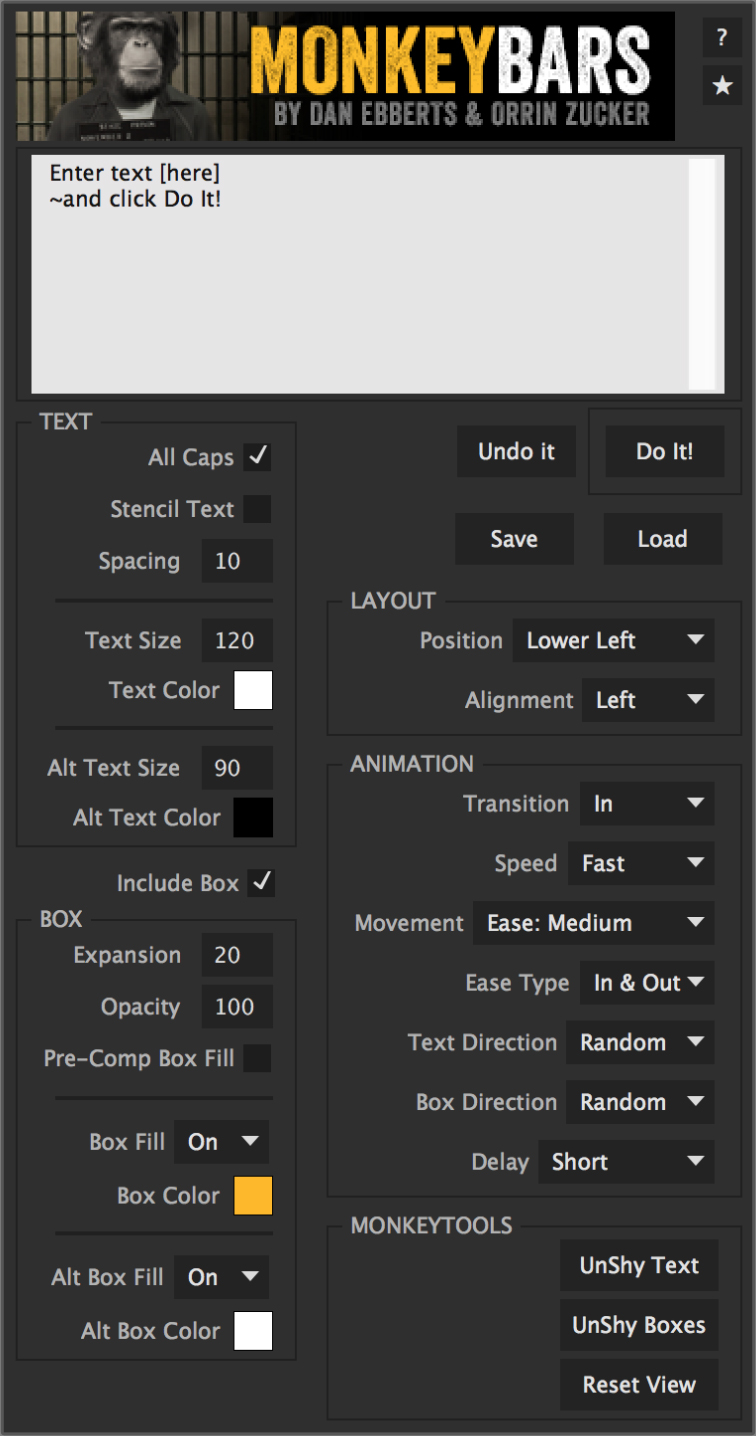
MonkeyBars is an After Effects script for building animated lower thirds with text and boxes. Ebberts + Zucker’s product listing documents controls for transitions, speed, easing, movement, text and box direction, and delay.
Shape the timing and movement
The listing shows a settings combination with an in-and-out transition, fast speed, ease-out timing, inertia movement, random text and box direction, and medium delay. These controls let you adjust how the text and boxes enter and leave a composition.
Use artwork in the text boxes
MonkeyBars can use still images or video as a box fill. Select Pre-Comp Box Fill and build the comp to create a separate composition for each box, where you can place corresponding artwork. If a logo needs room, add spaces before or after the text in the entry field, then place the logo in its box composition.
Keep composition references intact
MonkeyBars builds use expressions that refer to the composition where they were created. Renaming that composition or the build layer can break the expressions. Moving builds into a project that already contains a composition with the same name can also break the expressions. Restore the original composition or build-layer name if it changes. When an imported project contains another composition with the referenced name, rename that other composition.
Take care when duplicating or pre-composing
The FAQ warns against duplicating MonkeyBars layers with markers: when duplicates are present, the builds take marker timing from the top MonkeyBars layer in the timeline. When pre-composing changes the composition name, the animation may freeze at full reveal because the expressions can no longer find the In and Out markers. Drag the composition onto the comp icon at the bottom of the Project window; for a manual pre-comp, use the existing composition name, choose “Move all attributes into the new composition,” and keep the new pre-comp’s name unchanged.