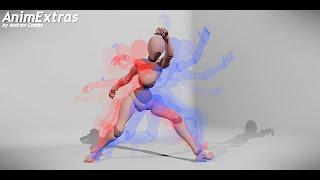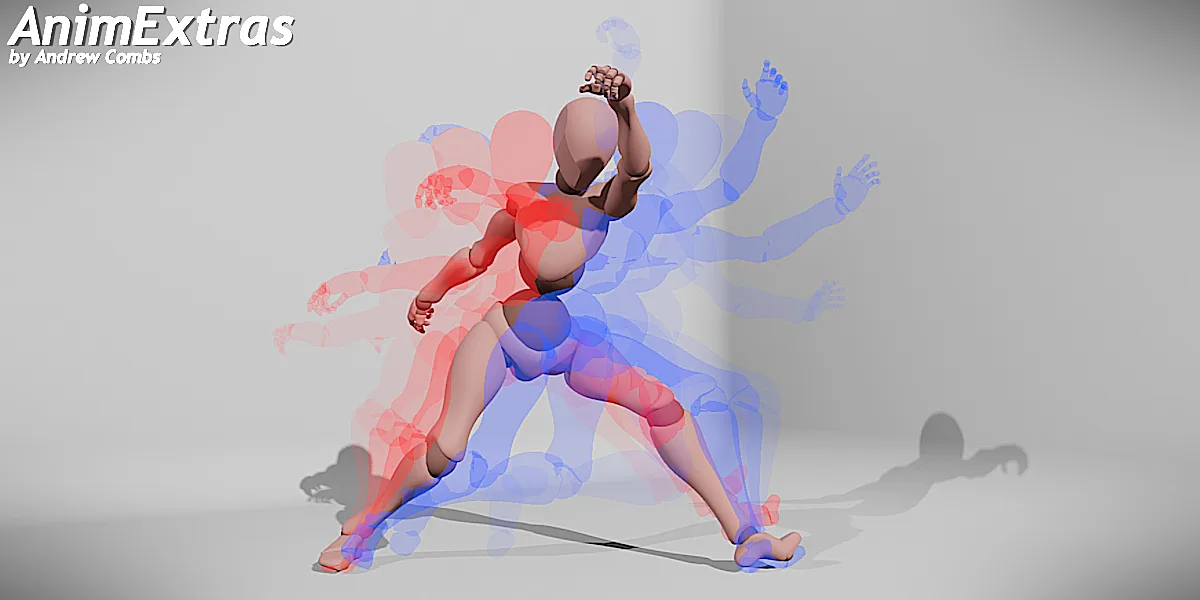
Animation Extras, also known as AnimExtras, is an open-source add-on for Blender animation. Its main feature draws 3D onion skins directly in the viewport using Blender’s BGL and GPU modules. The effect does not create extra meshes or materials.
Choose which frames to display
The add-on offers several ways to view animation around a frame. Per-Frame displays an onion skin for every frame. Per-Frame Stepped displays one every nth frame according to the step value. Direct Keys displays only frames with keyframed values.
The Amount control sets how many onion skins are visible on either side of any frame, based on the frame each onion skin is on rather than its order relative to the others. You can set past and future skins separately, including their colors, start and end opacity, and visibility. X-Ray disables depth so skins show through other objects. Flat Colors makes them solid, and Draw/Stop Drawing toggles their visibility.
Work with the onion object
Set Onion As Selected assigns an eligible selected mesh as the onion object. The mesh must have its own keyframes or a skeleton with keyframes. Update refreshes the skins to account for the object’s animation, including keyframe interpolation and shape keys. Clear Selected removes the current onion object and its associated data. Disabling viewport overlays also turns off onion skins.
Version and compatibility
Version 1.1.0 added Inbetweening mode, which shows frames with direct keyframes in a different color from interpolated frames. The release also included code cleanup. The product page lists Blender 2.8, 2.81, 2.82, 2.83 and 2.9. Its version 1.0.2 notes describe a single package for Blender 2.8 through 2.9 and certain alpha versions. Check the product listing for current compatibility before installing in a later Blender release. The add-on is released under the MIT license. See the feature documentation for its controls.