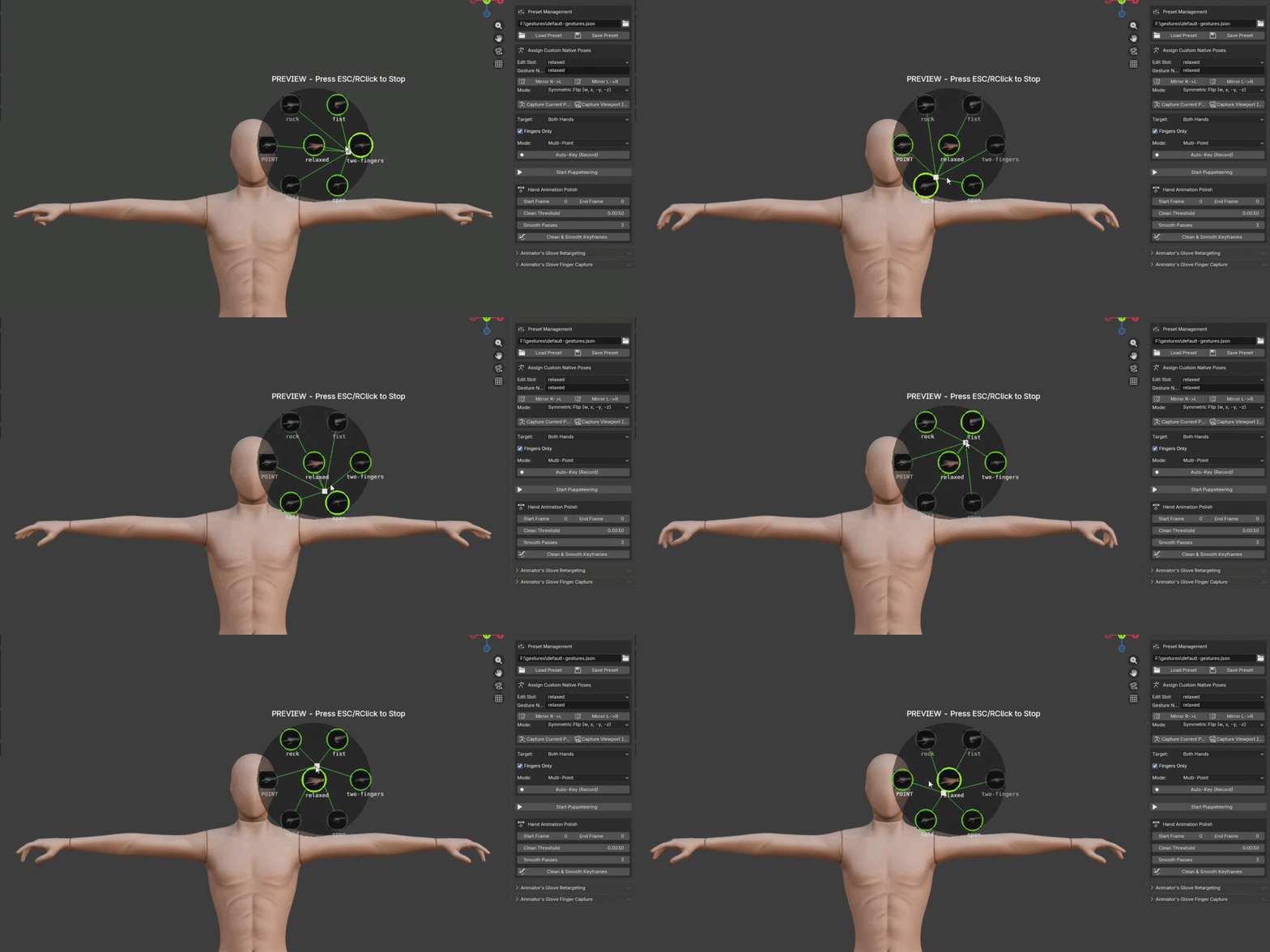
Animator’s Glove Suite is a Blender add-on for creating and animating character hand gestures in the 3D viewport. Move the mouse to blend custom hand poses, record the motion as keyframes with Auto-Key enabled, and save gestures for use across characters and scenes.
Blend hand poses in the viewport
The puppeteering modal uses seven pose nodes: one at the center and six around it. Moving the cursor changes how strongly each pose influences the hand, while on-screen lines show the active weights. Turn on Auto-Key to record keyframes as you move. Right-click or press Esc to finish and lock in the pose.
Save and reuse gesture presets
Capture a posed hand into any of the seven slots with one click. Save and load complete setups as JSON files, then reuse them across characters or projects. The mirroring tools transfer poses between right and left hands and support parallel-axis rigging systems.
Capture finger poses from an image
The separate Finger Capture add-on uses MediaPipe landmark detection to derive finger rotations from a single 2D reference image. Install and enable the Finger Capture add-on, use its panel to install MediaPipe and download the model, then select an armature and load an image. Preview the detected landmarks before applying the pose. The product instructions recommend using a Mixamo rig for the initial image capture; save that pose to a preset to apply it to other rig systems.
Retarget and refine animation
The product listing names Mixamo, Daz, Cascadeur, Auto-Rig Pro, and Rigify as supported rigs. Its retargeting module can map custom armatures with non-standard bone names. For cleanup, use keyframe reduction with adjustable thresholds or run iterative smoothing passes. Fingers Only mode layers finger gestures over existing body animation without overwriting wrist or arm bones.
Install and start puppeteering
- In Blender, open Edit > Preferences > Add-ons, install the ZIP file, and enable Animator’s Glove.
- Select the character’s armature, enter Pose Mode, and open the Animation tab in the N-panel.
- Load a preset or capture poses into the seven slots, then click Start Puppeteering.
- Move the mouse to blend the poses. Right-click or press Esc to finish.
Compatibility and license
At retrieval, the Superhive product listing specified Blender 3.0–5.1 compatibility and a GPL license. Check the listing and its documentation for current requirements and setup details.