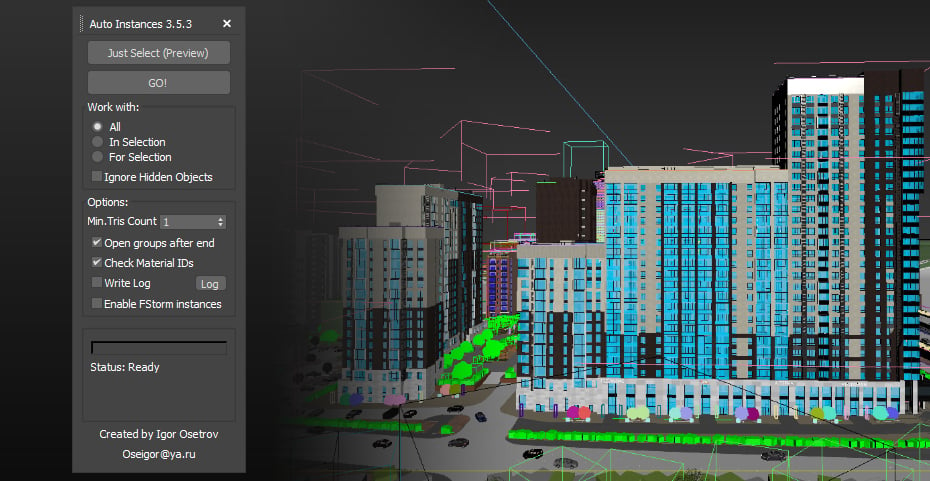
Auto instances is a 3ds Max script that finds geometric objects with completely identical geometry and converts them into instances while preserving their rotation and scale. Sharing geometry can reduce RAM use and scene file size, and may shorten save and open times. Within the 3ds Max 2014-2022 range listed by ScriptSpot, use it when a scene contains repeated meshes, then review the candidates before applying the change.
Where it helps
Scenes built from imported assets or other artists' models can contain repeated geometry. Auto instances can replace separate copies with shared instances. The supplied descriptions do not quantify the possible RAM, file-size, or save/open-time savings. Check the result on a copy of your scene to see whether it helps your project.
Preview before optimizing
Click Just Select (Preview) to select objects the script can instantiate. It reports the number of objects and triangles without changing the scene. Click GO! to run the optimization. ScriptSpot recommends backing up the scene before running the script.
Limits and modifier behavior
- It works with geometric objects. Splines and lights are unsupported.
- Texture-coordinate differences are not considered during comparison. Check objects that rely on different UV layouts before running the script.
- Objects rotated or scaled at the subobject level are treated as different and will not be instanced together.
- Modifier animation is not considered. Avoid using the optimization on animated objects when preserving that animation matters.
- The script may collapse modifier stacks before instancing objects. It tries to keep Turbo Smooth when it is at the top of the stack, so inspect other modifiers and test on a backup.
Version and download
ScriptSpot identifies Osetrov as the developer and lists version 3.5.3 for 3ds Max 2014-2022. For a download, check Osetrov's Gumroad page.