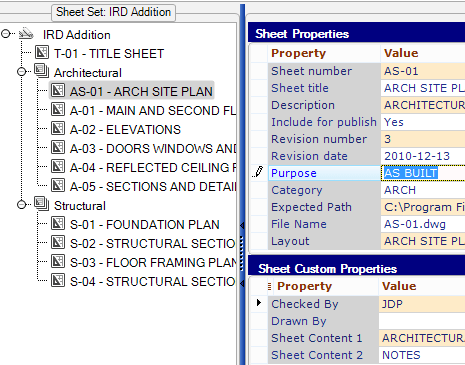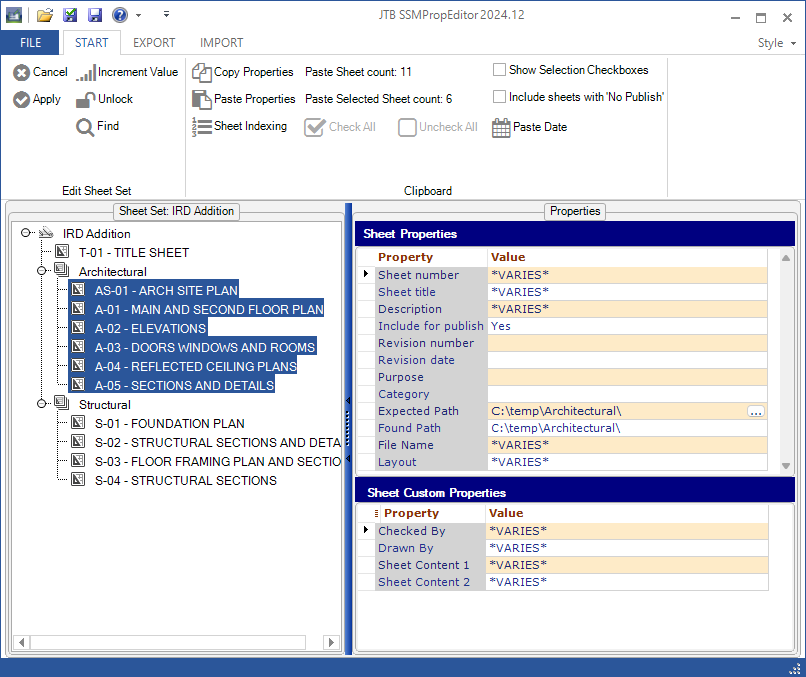
JTB SSMPropEditor Testversion is a 30-day trial with full functionality for editing properties across multiple sheets in Autodesk AutoCAD Sheet Set Manager (SSM) or the AutoCAD Architecture Project Navigator (PN) sheet set view. It is suited to batch changes such as revisions, dates, or sheet names. See the Autodesk App Store listing for the Testversion details.
Edit properties across a sheet set
The editor covers sheet set properties, sheet set custom properties, sheet properties, and sheet custom properties. You can copy sheet properties from one sheet to one or more others, copy sheet set properties between sets, increment revisions on multiple sheets, or add the total sheet count to a property. The editor can optionally rename the drawing file associated with a sheet.
SSMPropEditor can help with unsupported characters in a sheet title and the 64-character name limit error. It also includes a tool to update or correct nonexistent paths to improve SSM performance within AutoCAD.
Export, edit, and import property data
Export sheet property information to a file that can be opened in Excel. After making manual changes, import the exported file again. Use Find or Find and Replace in Notepad or Excel before importing.
Open sheet drawings from the tree view
From the tree view, launch a DWG application to open a sheet drawing. Examples include AutoCAD, AutoCAD LT, and TrueView. SSMPropEditor runs independently, so AutoCAD does not need to be running while you use it.
Trial, installer, and documentation
The app uses a custom installer rather than the standard App Store installer. Uninstalling does not remove a Desktop shortcut created during setup, so delete it manually if needed. JTB World provides SSMPropEditor documentation on its product page and support through its contact page.