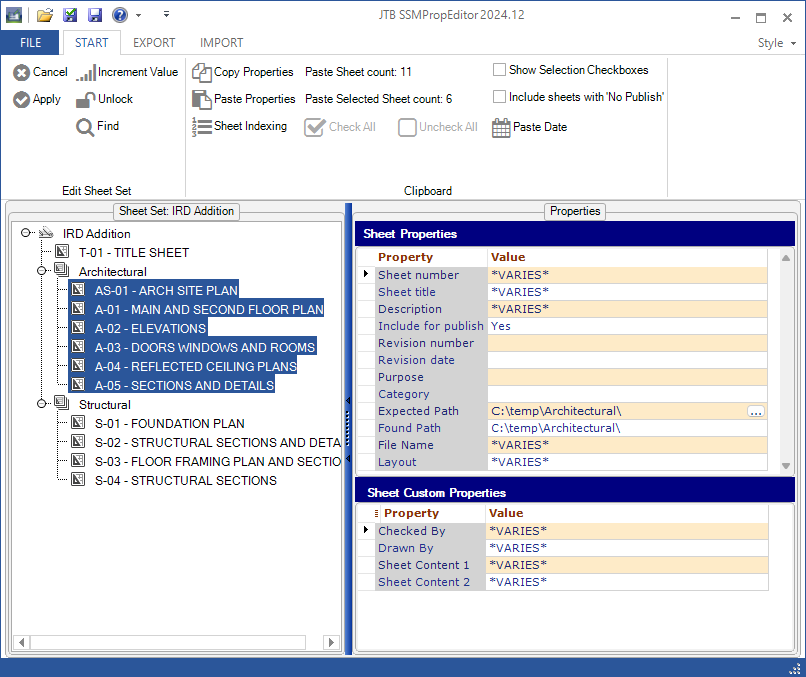
Sheet set to/from Excel - PRO by NTCL Soft exports built-in and custom sheet properties, along with drawing paths, to Excel. Edit the data with Excel AutoFill, then import the changes into the sheet set file. The listing describes an AutoCAD add-in and a separate standalone Windows application.
Batch edit sheet properties in Excel
The add-in can edit eight built-in properties: Sheet Number, Sheet Title, Description, Include for Publish, Revision Number, Revision Date, Purpose, and Category. It also supports all custom sheet properties and sheet drawing paths. Using Excel as an external editor lets you apply batch changes with AutoFill before importing them back to the sheet set.
This can help with recurring property updates or drawing-path changes across a set. Sheet-set content can be in any language, though some non-English characters may change incorrectly during Excel import. NTCL Soft suggests unchecking the "Encrypt result sheet set (.DST) file" option or updating the app to version 1.1.5 or later. The app interfaces support eight languages, while progress messages in the status text box are in English.
Other sheet-set tasks
The app can convert .DST files to XML and back, remove sheet-set association data embedded in drawings, clone a sheet set and copy related drawing files to another folder, and batch-fix missing sheets by assigning a drawing path.
Check drawing paths before importing
The app replaces file paths without checking whether the new paths are valid. Verify each destination path. NTCL Soft also advises that the old and new drawing files should be similar, with at least the same layout objects, to maintain a valid sheet set.
After editing, use Resave All Sheets in Sheet Set Manager to rebuild the association data between the .DST file and its drawings. NTCL Soft recommends this after editing a sheet set, and says it is mandatory when the standalone application made the edits.
AutoCAD's Rename and Renumber Sheet dialog does not support these characters in sheet numbers or titles: \ < > / ? " : ; * | , = `. Excel still allows them, so check the sheet set for errors if you use those characters.
Trial and license options
The listing describes a 30-day trial that requires signing in to the parent Autodesk application with the Autodesk ID used to download the app. The trial has no offline license. After purchase, the add-in can use an online license by signing in with the purchasing Autodesk ID and connecting to the internet, or an offline license tied to the computer's hardware. The standalone application requires an offline license; signing in to Autodesk does not license it. The listing also notes that launching the package in a virtual machine limits its features.
NTCL Soft provides a license registration guide and a troubleshooting page.