BaseHead Panel connects the BaseHead application to Adobe Premiere Pro. BaseHead handles searching and organizing sound effects and music; the panel lets BaseHead send selected audio into a Premiere project through its Target App integration. It suits editors who manage a sound library in BaseHead and want to place cues in a Premiere sequence or Media Bin.
Spot sounds into a sequence or bin
For Spot to Track, select the destination audio track in Premiere Pro, place the playhead, select a file in BaseHead and press S. BaseHead places the file on the selected track at the playhead position. Its current integration guide says spotting works with or without handles.
Use X when you want to send a file to Premiere's Media Bin without placing it on the timeline. The BaseHead Premiere Pro guide describes both actions and their keyboard commands.
Follow the active project folder
Follow Session Folder makes BaseHead's transfer path follow the audio-files folder of the active Premiere project. This can keep transferred media with the project as you switch sessions. An earlier BaseHead setup guide documented Auto-Switching Paths for Premiere Pro.
Install the panel and keep it connected
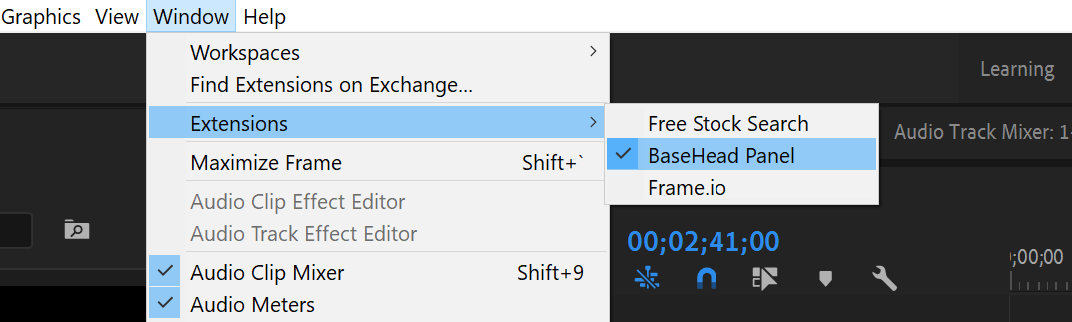
The panel ships with the full BaseHead installer. After installing BaseHead, reopen Premiere Pro and look for the panel under Window > Extensions. Keep the panel open while using the integration: BaseHead's documentation says the connection drops when the panel is closed. See the Adobe Exchange listing and the developer's guide for product and setup details.
Check version and edition details
The available product record lists version 20.22.02, Premiere Pro 11.0+ compatibility and a last update of November 18, 2021. The current BaseHead guide describes the integration but does not state a minimum Premiere Pro version, so confirm compatibility before relying on that older version listing. BaseHead's edition information lists Spot to Track and full Target App support among paid-edition features; check that your BaseHead license includes the actions you need.