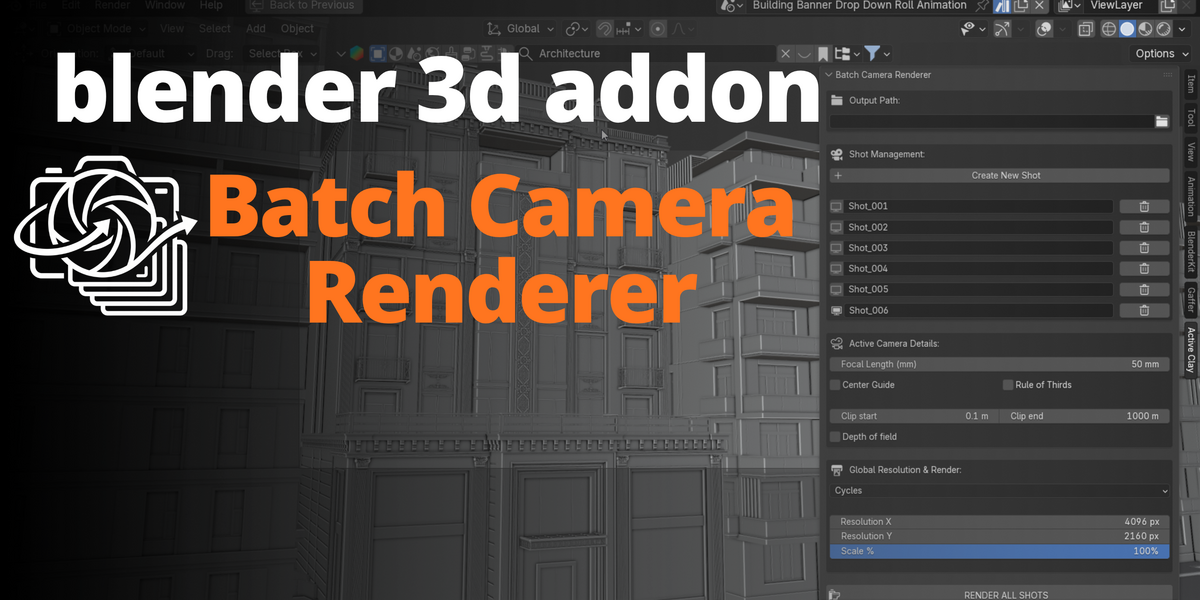
Batch Camera Renderer is a Blender add-on for rendering a saved set of views without selecting each camera and starting a separate render. Its panel in the 3D Viewport stores shots under names such as Shot_001. That suits repeatable product angles, architectural walkthroughs, and scene portfolios. The product listing identifies active clay as the creator and lists Blender 4.2 through 5.2 compatibility.
Capture and adjust views
After installing and enabling the add-on as described below, open the 3D Viewport sidebar by pressing N, then choose the Active Clay tab. Frame a view and select Create New Shot to capture the current viewport perspective or active camera position. Select a saved shot to return to its view, then adjust focal length, depth of field, clipping, or composition guides in Active Camera Details.
Preview before rendering
Viewport Preview creates quick OpenGL screenshots of the angles in the list. Use them to check framing or layout before starting full renders. The product FAQ says preview files use the Preview_ prefix.
Set the output folder and render
Set the Output Path before adding shots. When the list is ready, select Render All Shots and confirm. Blender cycles through the camera list, saves each render as a separate file, and shows a live status counter. The product FAQ says generated names are based on the active camera and existing images are not overwritten; final renders use the Render_ prefix.
Install the add-on
In Blender, go to Edit > Preferences > Add-ons > Install, select the downloaded .py file, and enable the add-on. Then open the 3D Viewport sidebar and select Active Clay. The product documentation covers setup and the shot workflow.