Fast Render Preview is a Blender add-on by GilaDDD for making quick, small renders while you check a scene’s direction. Press Alt+F12 to run a preview without manually changing render settings each time.
How preview renders work
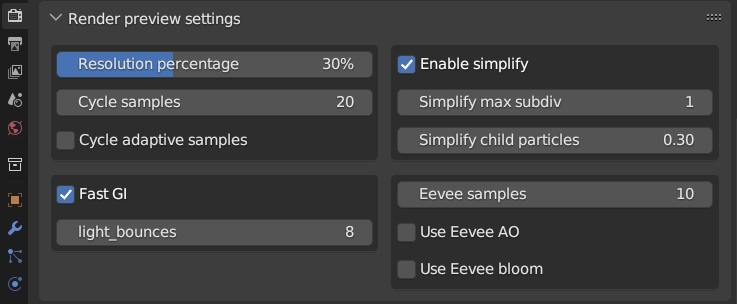
The add-on applies settings for a simple preview image, including values such as sample count and resolution. When the render finishes, it restores the settings that were in place before the preview. This helps when you want to inspect several versions of a scene without resetting your full-quality settings between renders.
Choose the preview settings
The developer documentation says to set the preview render values in the add-on settings or the Render Properties panel. Then start a preview with Alt+F12 or the Fast Render button in Blender’s Render menu. The add-on uses those preview values for the render and returns to the previous settings when it finishes.
Blender versions and render engines
The Superhive listing identifies Blender 5.0 to 5.1 and the Cycles and Eevee render engines. Its changelog says version 1.2 was updated for Blender 5.0 settings on June 17, 2026. Version 1.1 removed the Eevee bloom option because Eevee no longer supported it. The listing gives the license as GPL.