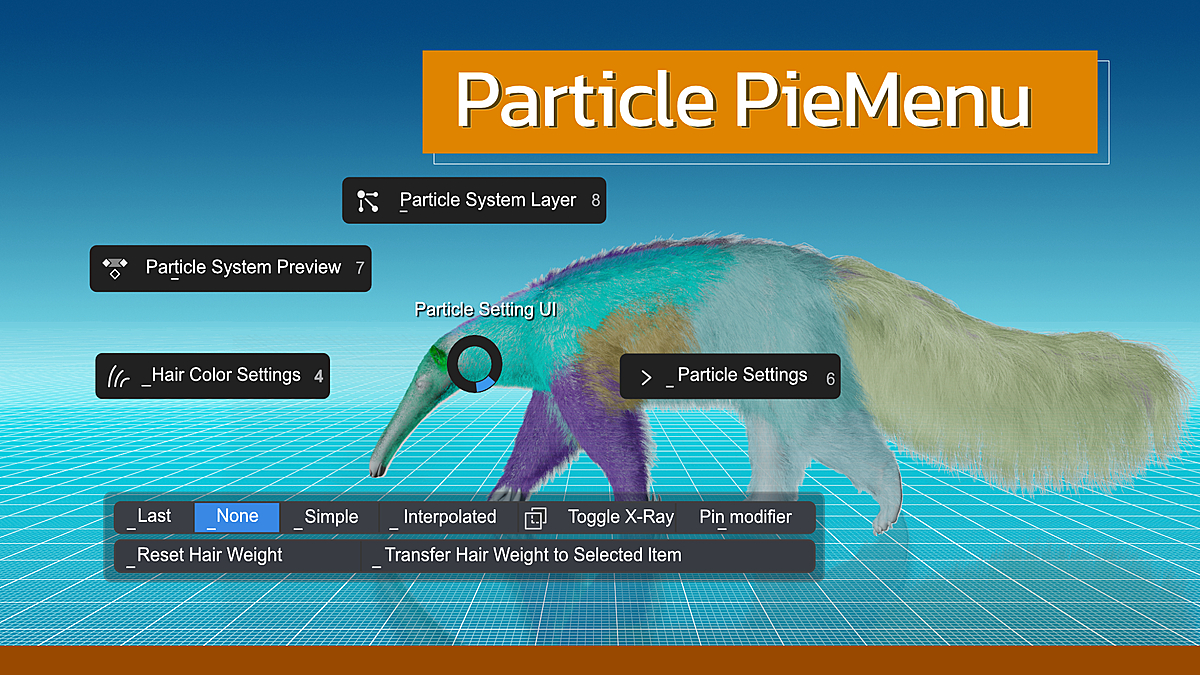
Particle Pie Menu is a Blender add-on by VFX Grace for editing hair particle systems. Its pie menus group controls by mode, with particle setup and render options in Object Mode and grooming tools in Edit Mode. VFX Grace's product listing includes Blender 3.3 and 3.4, while its documentation page lists versions only through 3.2.
Hair particle controls in Object Mode
In Object Mode, the add-on can change the hair display color, set a random hair color, add or remove hair systems, copy hair to a selected object, and modify particle system order and settings. Render controls include strand shape, render and display steps, and material assignment. You can also switch children between None, Simple, and Interpolated, toggle X-ray, keyframe the particle system display, or move a modifier to the top or bottom of the stack.
Grooming options in Edit Mode
In particle Edit Mode, a pie menu provides one-click selection of a particle brush. Its editing options include displaying children, setting path steps, enabling X-axis symmetry, and preserving strand length or root position. The listing also names Hair Brush and Deflect emitter controls, along with child-type switching.
Hair weight reset and transfer
Reset Hair Weight restores the active particle system's hair weight to its default and requires confirmation. The listing says this reset does not support batch operation. Copy Hair Weight to Selected Item transfers weight from the source object to the target object: select the target first, then the source, and run the transfer. The target particle system should have been edited in Hair Edit mode. The product listing describes the transfer as using Blender's generic data transfer. AnyPlugins says both weight actions open confirmation dialogs. Superhive's transfer note names Reset Hair Weight and says confirming resets the hair weight, so its documentation does not clearly establish a separate dialog for Copy Hair Weight to Selected Item.
Compatibility and installation notes
The product listing names Blender versions 2.79b, 2.80, 2.81, 2.81a, 2.82, 2.83, 2.92, 2.93, and 3.0 through 3.4. The separate documentation page lists versions only through 3.2, so the published compatibility information differs. Confirm support with VFX Grace if you plan to use Blender 3.3 or 3.4. The published installation steps say to open Edit, Preferences, Add-ons, then Install, and select the add-on file.