Blender Auto Focus Camera Addon, by Wanderson M. Pimenta, adjusts camera focus based on what appears at the center of the view. It provides controls for focus transitions, depth of field, and focus effects, so you can change focus during a camera move without setting every focus distance by hand. Focus tools work with Eevee and Cycles. On Windows, Auto Exposure measures the rendered camera view and calculates an exposure correction over time for animation baking; Eevee is recommended for responsive metering and baking. The Superhive product page and its documentation describe the available controls and baking workflow.
Set focus behavior in Blender
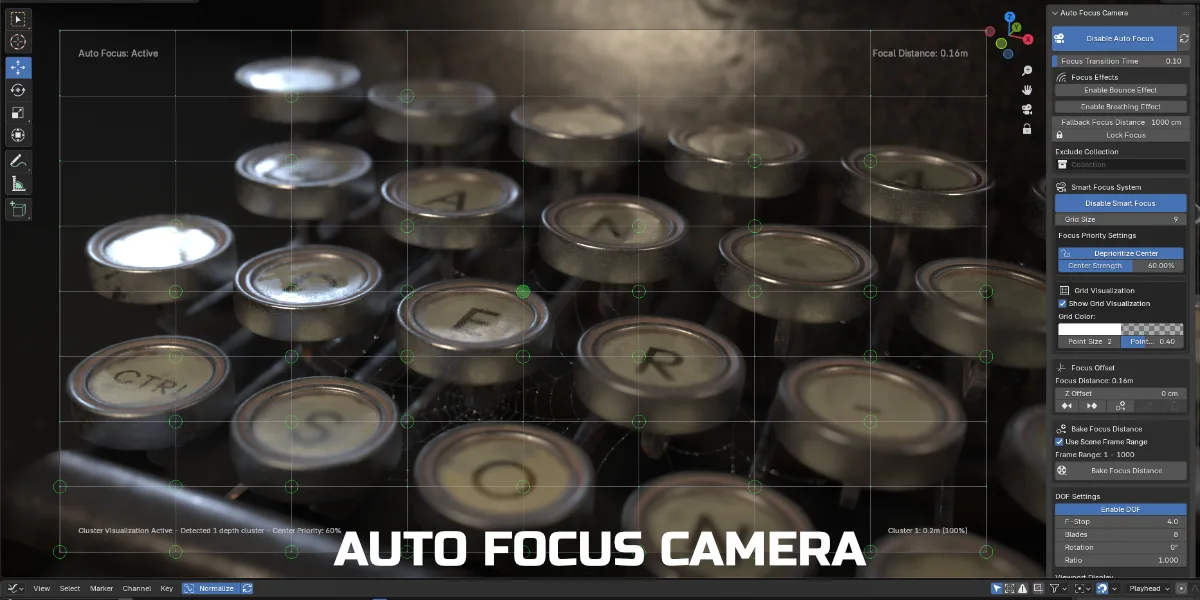
Enable Auto Focus to start tracking, then adjust Focus Transition Time to control how quickly focus shifts between objects. The documentation recommends values from 0.1 to 0.3 for gradual transitions. A value of 0 changes focus instantly, while 1 gives a slower transition of one second.
Smart Focus analyzes multiple points across a grid. You can increase the grid size for more precise analysis, with slower processing as the tradeoff. Center and proximity priorities let you favor points near the middle of the frame or closer to the camera. An optional grid overlay shows the focus points in the viewport.
Adjust and animate the focus point
Focus Offset moves the selected focus distance forward or backward. When Smart Focus is disabled, X and Y offsets are also available to shift the focus point horizontally or vertically. The panel displays the active camera's current focus distance in meters.
Five keyframe controls let you move between focus-offset keyframes, add one at the current frame, remove the current keyframe, or clear them all. For depth-of-field styling, the addon includes F-stop, aperture blade count, blade rotation, ratio, and focus limits. The bounce effect adds adjustable focus oscillation, while the breathing effect adds a subtle zoom change during focusing.
Bake focus before rendering or sharing
The addon runs inside the Blender interface. Its live focus adjustments need baking before command-line rendering, viewport rendering, or sharing a project with someone who does not have the addon. Baking creates focus-distance keyframes for each frame in either the scene frame range or a custom range. After baking, a Delete Baked Keyframes control appears so you can remove the baked keys before making changes.
A practical sequence is to enable autofocus, set the transition time, adjust the offset if needed, configure depth of field, and bake the chosen frame range before rendering. If autofocus stops responding, the documentation recommends using the Refresh button. If baked keys look wrong, delete them and bake the range again.