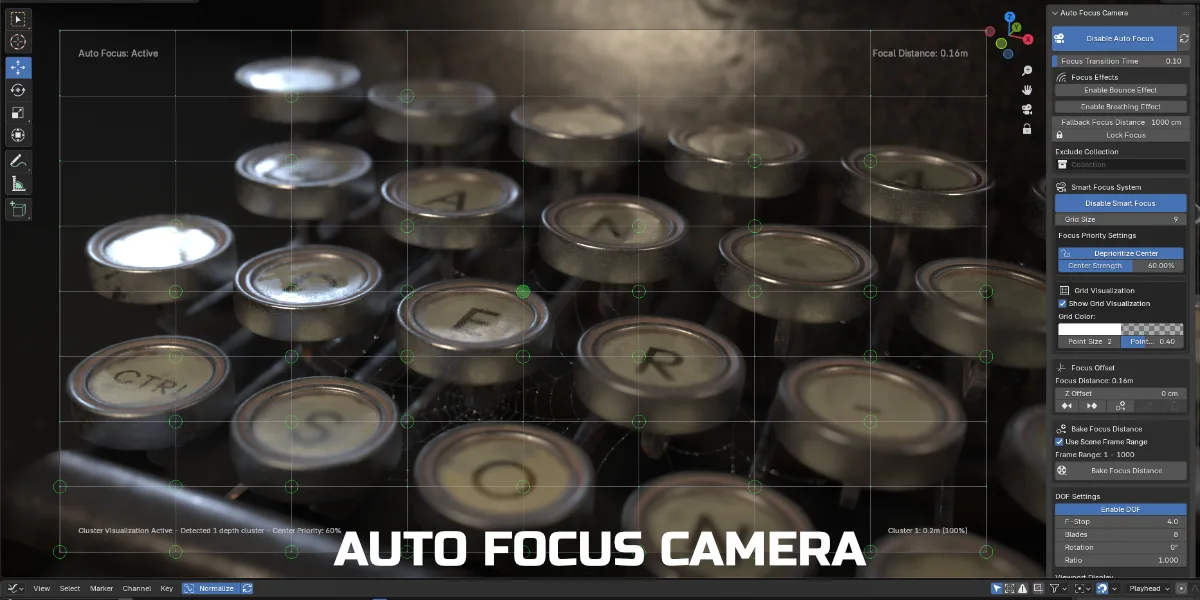
Pimp My Cam - Autofocus is a Blender add-on by Octopus Elbow for automatic camera focus and handheld-style movement. It casts rays from the center of the camera view and adjusts focus distance to the visible object, so focus can follow what the camera sees without assigning a target or keyframing focus changes.
How autofocus and camera motion work
After you apply autofocus to a camera, the add-on recalculates focus based on objects in front of the camera. Its Transition Time setting controls how quickly focus shifts: lower values make changes faster, while higher values make them smoother. Ray Sampling Interval sets how often, in frames, the add-on checks the scene. The documentation describes a higher interval as producing a more laggy, phone-like response.
For a simulated lens effect, Sensor Width Adaptation changes sensor width as focus shifts, and a slider adjusts the strength. The Human Walk effect adds camera shake. Set its intensity and length, then remove the effect when you no longer need it. The product listing also describes noise-curve controls for subtle handheld motion or stronger action-camera movement.
Install and apply the add-on
- Download the add-on ZIP from the product listing.
- In Blender, open Edit > Preferences > Add-ons and choose Install.
- Select the ZIP file, enable PimpMyCam in the add-ons list, and save preferences.
- Select a camera and enable Depth of Field on it.
- Open the N-panel in the 3D Viewport and click Add Autofocus to Selected Camera.
The add-on's settings are in Blender's N-panel. The product page says effects can be toggled without baking or setting keyframes. The PimpMyCam documentation describes the installation and controls in more detail.
Compatibility and license
The marketplace listing identifies Pimp My Cam as an add-on, lists Blender 3.0 to 4.2 compatibility, and names Eevee and Cycles as supported render engines. It also lists the license as GPL and says the add-on has no external dependencies. Check the product listing for current compatibility and distribution details before installing.