Blender Batch Renamer & Sorter is a Blender add-on for renaming selected objects in batches and sorting them by name, type, or parent. Its preview shows proposed names before you apply them, and a name backup can restore the original names.
Rename objects with a preview
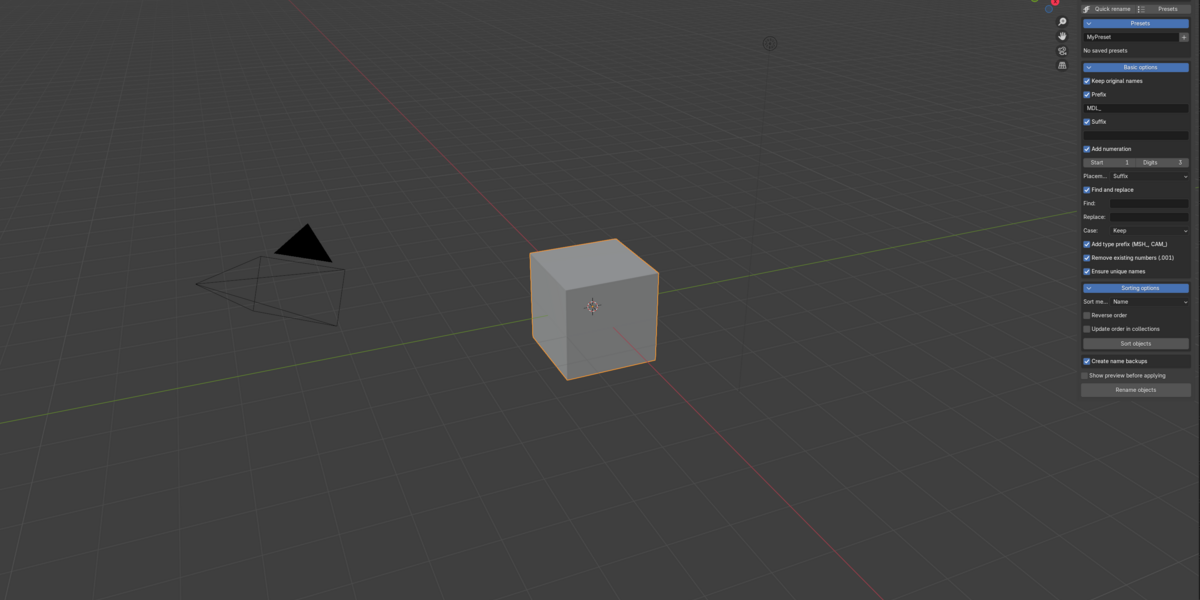
Select the objects you want to rename, then open the Renamer tab in the View3D sidebar. For a quick rename, press Alt+R or use the right-click menu. The naming options include a base name, prefixes and suffixes, sequential numbering, find and replace, case conversion, and type-based prefixes such as MSH_ or CAM_. You can also keep original names as the base, remove existing number suffixes, and ensure the resulting names are unique.
Enable the preview before applying changes to inspect the proposed names. The documentation says you can edit names in the preview list before committing them. For example, its type-and-numbering preset uses patterns such as MSH_OBJ_001 and CAM_OBJ_002.
Sort selected objects and save naming presets
The sorting controls organize selected objects by name, type, or parent. Choose a method in the Sorting options section, then click Sort objects or press Alt+S. The product listing also describes collection order management for keeping object order consistent within collections, with batch processing that accounts for scene hierarchy.
Quick presets are available from the Presets button, and custom presets can save naming strategies for reuse. This can help when a project uses the same naming pattern across several groups of objects.
Restore names and check compatibility
Turn on Create name backups to preserve the original names before renaming. If you need to revert those changes, use Restore original names. This gives you a way to recover the saved names without relying on a manually recorded list.
The product documentation lists the controls and access methods. The Superhive listing identifies Blender 2.8 through 4.4 and the GPL license. Check the listing for compatibility and licensing details before installing on a version outside that range or redistributing the add-on.