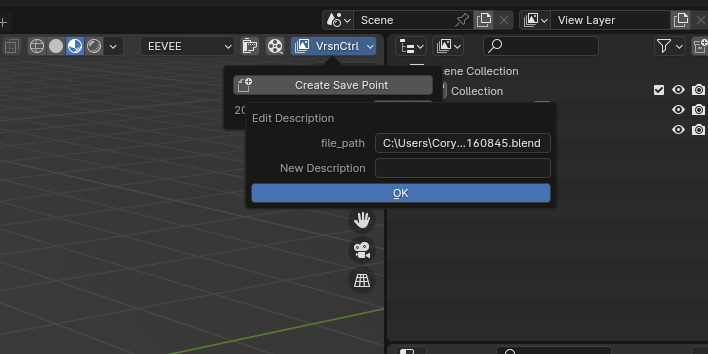
Vrsn Ctrl is a Blender add-on for managing project save points. You can create, load, edit, and delete points, with a timestamp and an optional description for each one. The product listing and its README describe these in-app controls.
How Vrsn Ctrl save points work
Create a save point to mark a project state. Its timestamp helps distinguish when it was made, while a description can record the stage or change you want to remember. Later, load a point to return to that saved state, edit its description, or delete it.
This can suit a workflow where you want named checkpoints around a series of modeling or animation changes. The supplied documentation describes creating points through the add-on; it does not specify whether points are created automatically, where they are stored, or how long they are retained. Check those details before relying on the add-on as your only recovery method.
Where it appears in Blender
Vrsn Ctrl can appear in the 3D View Sidebar, the Header, or both. The README says these display options are configured in Add-on Preferences. Choosing a location gives you access to save point controls from the part of Blender's interface that fits your workspace.
Compatibility, installation, and license
The product listing states Blender 2.80 and above. Its version list specifically names releases from the 2.9 series through Blender 4.0, so check the current listing or ask Toon Ups about compatibility with a newer build.
The README describes installing the downloaded add-on through Edit > Preferences > Add-ons > Install, selecting the downloaded file, and enabling the add-on. The marketplace listing identifies its license as GPL.
What the documentation covers
The supplied materials do not specify whether Vrsn Ctrl supports Git repository operations, branching, team synchronization, or off-device backups. If you need any of those, confirm the add-on's capabilities with Toon Ups before choosing it for that workflow.