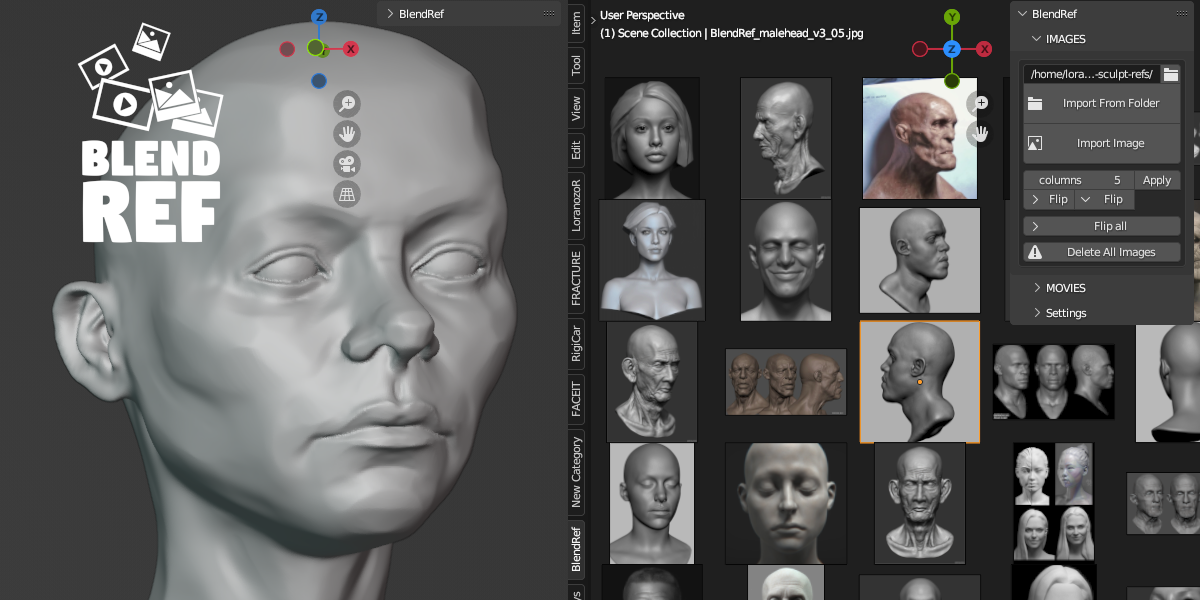
BlendRef by Picto Filmo keeps image and video references in the Blender viewport while you sculpt, model, or animate. You can move and zoom references within Blender’s interface instead of switching to a separate reference app. Version 1.71 lets users rename BlendRef collections, according to the Superhive product listing .
Organize image references
Import a folder or individual images, then arrange them in columns. BlendRef lets you flip images horizontally or vertically, rotate them, and adjust their scale. You can add text to sort references. The add-on keeps references in specific collections that you can append into another blend file.
Earlier release notes say version 1.6 added rendering and exporting copies of selected images to a folder.
Review motion with video controls
For animation references, BlendRef can loop an A-to-B segment and slow it down. Its notes say the preview range follows playback-speed changes, so you do not need to disable and re-enable it after switching speeds.
Check compatibility and setup
The marketplace listing labels Blender Version 5.0, and its changelog says Blender 3.6 compatibility was added in version 1.7. The retrieved details do not give a complete supported version range, so check the current product listing for your Blender release.
The listing’s troubleshooting notes say the BlendRef window needs Show Overlays enabled. In some cases, hidden scene collections must be unhidden before images or movies can be imported. The page marks these items as issues for a future update, so check current documentation for their status.
AnyPlugins lists BlendRef as free to download and use; Superhive identifies its license as GPL. Confirm current download and license details on the product listing.