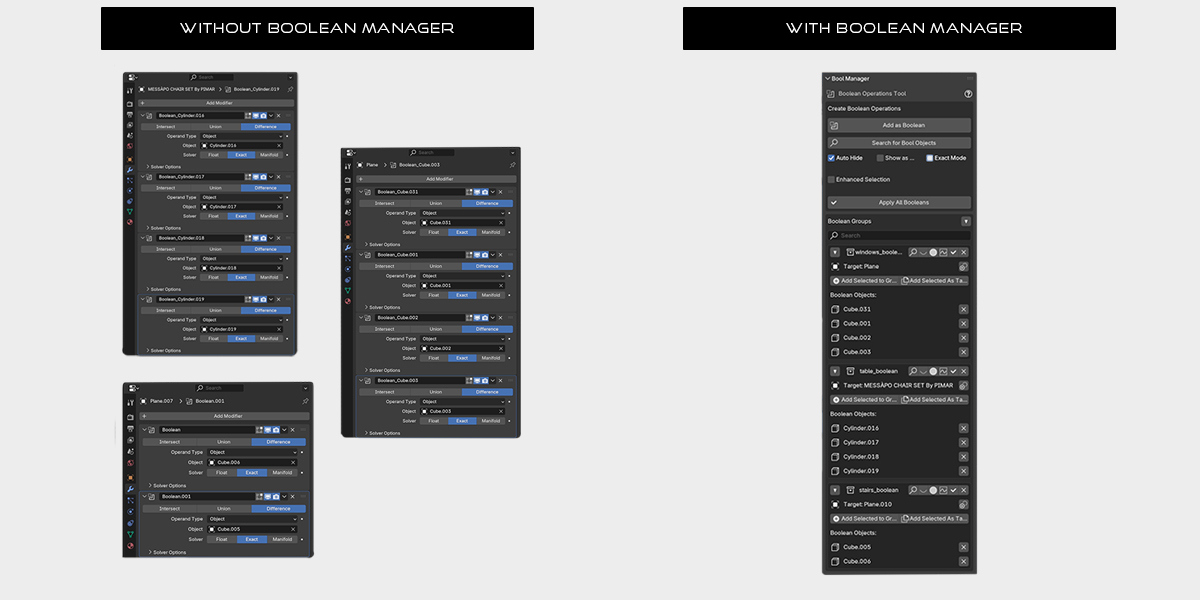
Bool Manager is a Blender add-on from Techqon core for creating and organizing boolean operations. It brings viewport-based cutter selection, operation groups, and display controls into one panel. It suits hard-surface modeling and kitbashing, including modular or sci-fi assets.
Add cutters from the viewport
Select one or more objects as cutters, click Add as Boolean, then choose a target object in the 3D viewport. Bool Manager applies and groups the operation. The cutters are deselected during target selection, and a group can contain multiple cutters or targets. Use Add Selected to Group to add cutters to an existing group or Add Selected as Target to change or add targets.
Organize groups and control visibility
Boolean groups keep cutters and their target together. You can rename groups, search for Boolean objects, and nest groups under named parent containers that can be collapsed or expanded. Group controls can toggle cutter visibility and wireframe display. Auto Hide hides cutters after an operation; turn it off when you want them to remain visible.
Choose calculation and display settings
Fast mode is intended for quick previews. Exact mode uses Blender's exact Boolean solver and is described in the documentation as more precise and slower. Modifier Display controls let you choose whether a Boolean is active in the viewport, edit mode, and final render. Show as Wire displays cutters as wireframes.
Install Bool Manager
Download the ZIP from the Bool Manager product listing or the developer's website. In Blender, open Edit > Preferences > Add-ons > Install, select the ZIP, and activate the add-on. Open the N panel and choose the Bool Manager tab. The documentation says Blender 3.5 or newer, while the product listing names Blender 4.2 through 4.5. Check the current listing or developer documentation for compatibility with your installation.