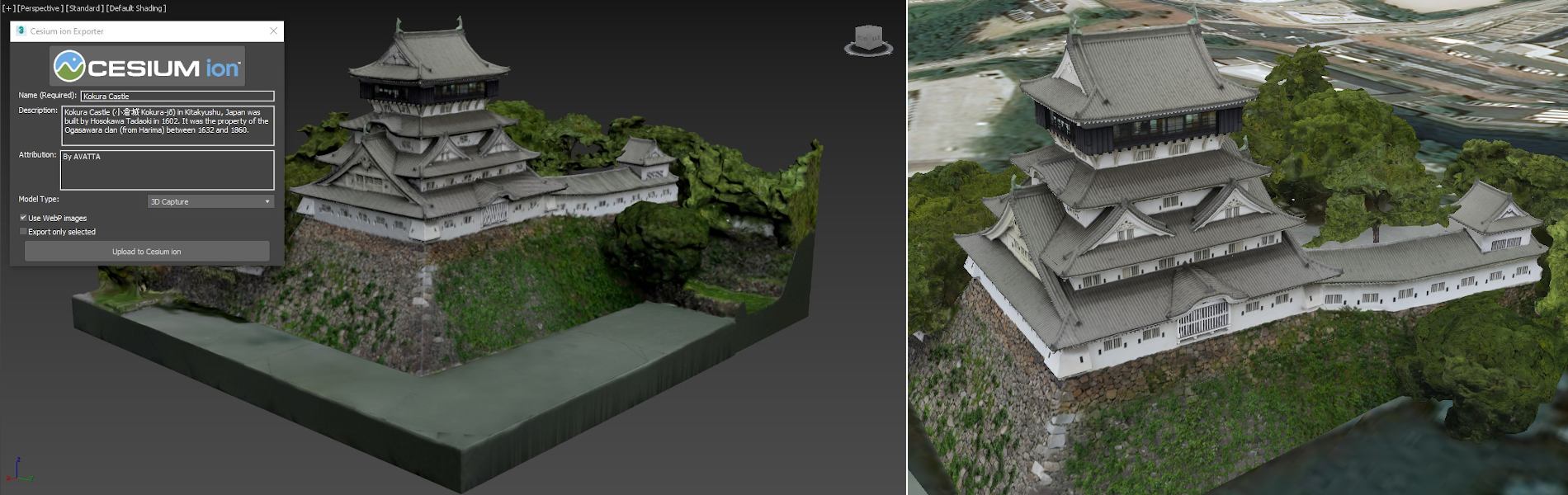
Cesium ion for 3ds Max is Cesium’s plugin for publishing worlds, scenes, and models from Autodesk 3ds Max to Cesium ion. The cloud service optimizes and tiles uploads as 3D Tiles, which can be streamed to CesiumJS and other applications. This workflow lets a 3ds Max model appear alongside geospatial context such as terrain or satellite imagery.
Publish a model from 3ds Max
Install the plugin from the Autodesk App Store listing, then open a scene in 3ds Max and choose File > Export > Export to Cesium ion. On first use, the plugin opens a browser window so you can authorize access to your Cesium ion account. In the exporter, enter an asset name; description and attribution are optional. Upload the model, then open the asset in the Cesium ion dashboard.
Choose the output and compression
Select a model type that matches the source. The repository tutorial recommends 3D Model for typical 3ds Max models and 3D Capture / Reality Model / Photogrammetry for scans, LiDAR, and photogrammetry meshes. The exporter also offers Draco or Meshopt geometry compression, or no geometry compression. Draco targets smaller files; Meshopt is optimized for runtime performance. The viewer must support KHR_draco_mesh_compression or EXT_meshopt_compression to load tiles compressed with those options.
KTX2 texture compression can reduce tileset size. Disable it if the target viewer does not support KTX2. Cesium’s plugin repository includes the exporter tutorial and further details.
Compatibility and account details
Autodesk lists version 1.1.1, updated September 19, 2024, for Windows 64-bit and 3ds Max 2020 through 2025. The listing does not confirm compatibility with newer releases, so check with Cesium before installing it for 3ds Max 2026 or later. Autodesk marks the extension Free and says to start with a free community account. Check Cesium’s site for current account details.
Autodesk materials must be baked to textures for Cesium ion. If materials render incorrectly after upload, bake them in 3ds Max and export again. The plugin’s code is public under the Apache-2.0 license, and the repository provides a publishing tutorial.