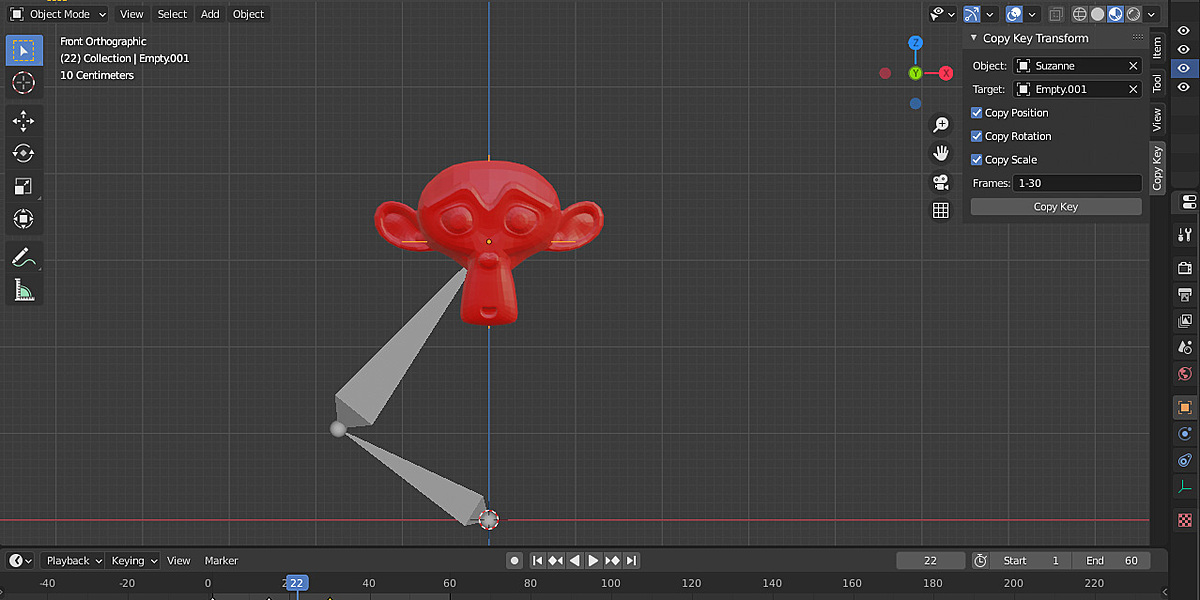
Copy Key Transform is a Blender add-on by Douripo for copying transform animation keyframes from a target object on specified frames. Its Superhive listing identifies version 1.0.0 as the initial release.
Choose which transform keys to copy
The add-on has separate toggles for location, rotation, and scale keyframes. Enable Copy Position for location, Copy Rotation for rotation, and Copy Scale for scale. You can choose one or combine them.
Enter specific frames or ranges
Use the Frames field to list the keyframes to copy. It accepts individual frame numbers and ranges in one entry, such as 1,3,5-10,25-100.
Compatibility and installation
The listing names Blender 2.8 through 2.83, 2.9 through 2.93, and versions 3.0 through 3.5. It does not state compatibility with later Blender versions, so check the product listing for current details.
To install it, open Edit > Preferences > Add-ons > Install in Blender and choose the downloaded ZIP file. To keep the add-on enabled for future uses, click the icon in the bottom corner and save preferences. These steps are in the product documentation.
Release and license
Superhive lists the add-on's license as GPL.