Cropdragon is a Premiere Pro extension that applies the standard Crop effect along a clip's alpha channel. It sets top, bottom, left, and right crop values to follow the visible content, which is useful for clips with transparent margins. The clip needs an alpha channel for this workflow.
Auto-crop and effect controls
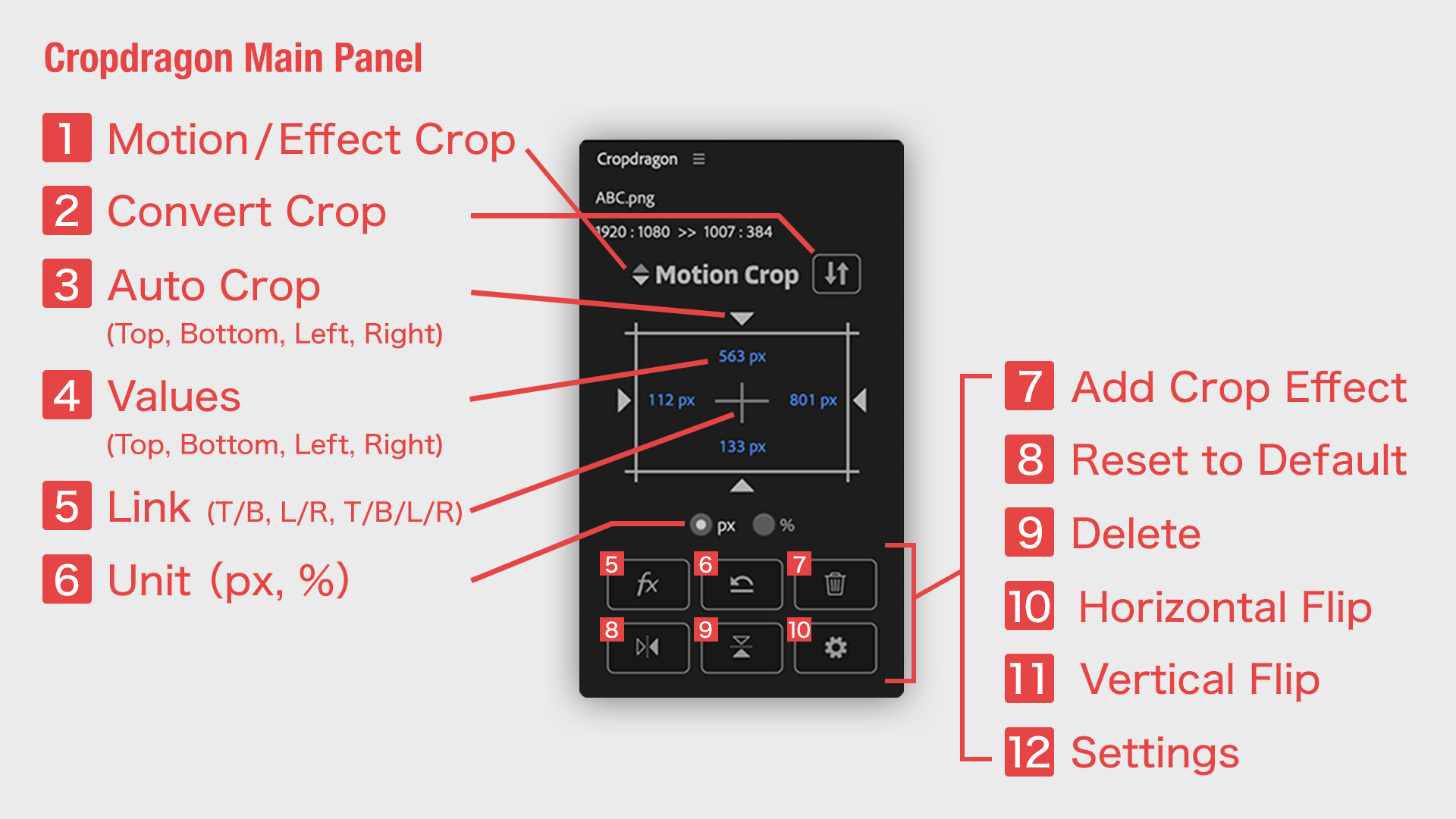
The panel can target either Motion Crop or the standard Crop effect. Convert Crop swaps the values between them. Auto Crop processes gaps along the alpha channel in sequence, with modifier-click options for changing how that crop is applied:
- Click to crop alpha-channel gaps in forward order; Shift-click to move through them in reverse.
- Option/Alt-click to crop along the alpha channel.
- Command/Ctrl-click to set the Crop effect value to zero.
Adjusting crop values
Enter a value directly or use arithmetic in a numeric field. The up and down keys change a value by one; hold Shift to change it by ten. You can also drag a value with the mouse. The link control cycles between linking left and right, top and bottom, or all four edges, which then adjust by the same value. Choose pixels or percent as the display unit.
Cropdragon can add or delete a Crop effect and flip its applied values horizontally or vertically. Its settings offer All, Horizontal, and Vertical layouts, with controls for which functions appear in the narrower layouts. The panel also offers five colors and an option to keep icons in the selected color.
Premiere Pro compatibility and release notes
The aescripts product page lists compatibility with Premiere Pro 2022 through 2026. It lists version 1.1.1, dated March 19, 2026, as a bug-fix release. Version 1.1.0, dated February 27, 2026, added Motion Crop support. The page also lists a free trial; check it for current availability and licensing details.