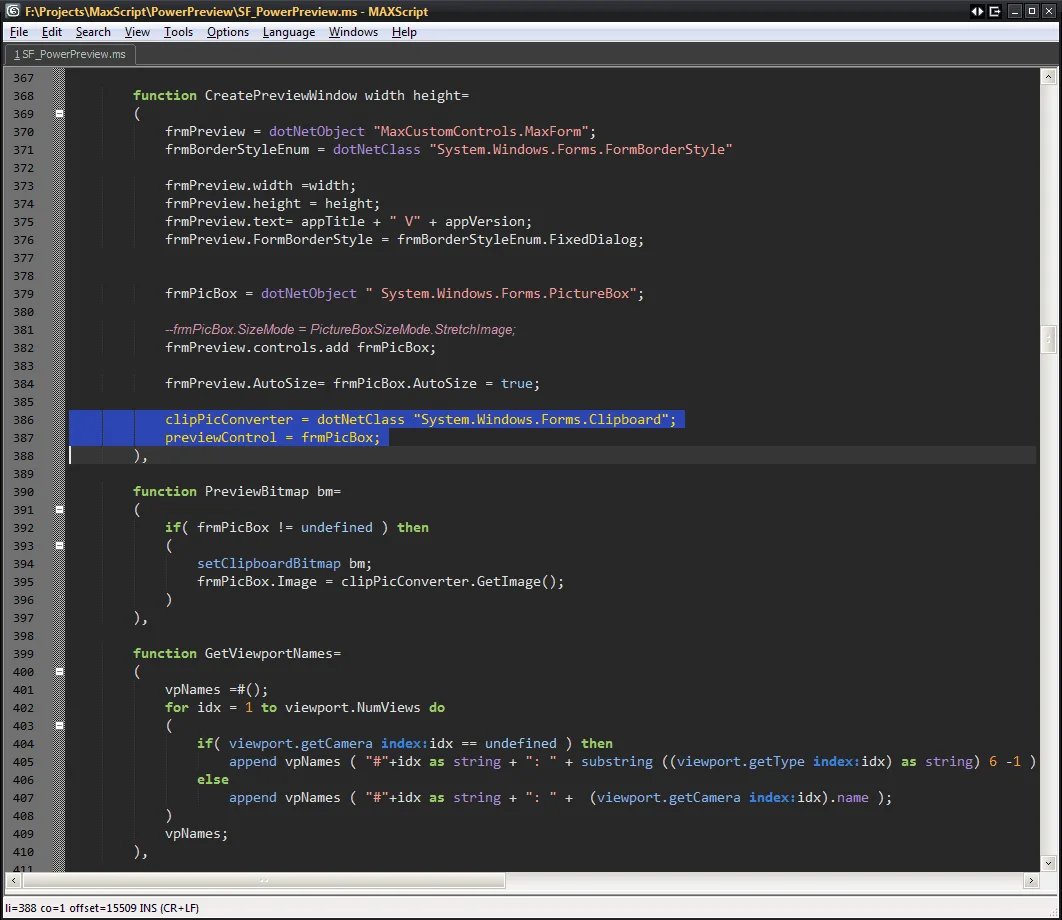
DarkScintilla is a dark color scheme for the Maxscript Editor in 3ds Max. It changes the editor’s color and font settings on its Scintilla core, drawing on schemes developer spacefrog used in MonoDevelop, FlashDevelop, Eclipse, and Visual Studio. The ScriptSpot listing identifies version 1.2d, lists compatibility with 3ds Max 2008 and up, and gives an update date of April 13, 2021.
What the scheme changes
Most of the color settings are in MXS_EditorUser.properties, where symbolic color names make them editable. The listing says nearly all color settings previously held in maxscript.properties were moved to this file. Its version history also notes that replacing maxscript.properties is no longer necessary.
Version 1.2d’s notes record a fix for a too-dark blue on FPS and struct properties, brighter global constants, and bold font styling. The scheme uses Microsoft’s Consolas font; the package includes a link to download it.
Installation
From version 1.2 onward, DarkScintilla includes an installer script. Drop the complete .mzp package into a 3ds Max viewport, then follow the script to install or uninstall the scheme. Back up your original files before installing, as the ScriptSpot listing advises.
The listing notes that Internet Explorer may save an .mzp package with a .zip extension. If that happens, change the extension back to .mzp before using the installer.
Scope and limitations
DarkScintilla targets the Maxscript Editor inside 3ds Max. In the ScriptSpot discussion, the author says using the scheme in standalone SciTE would require substantial changes because it depends on Maxscript-specific editor properties.
The package has no adapted html.properties, so HTML files displayed in the Maxscript Editor do not receive this color scheme. Its documented scope is the editor; the listing does not describe a dark theme for the rest of 3ds Max.