Development Kit Tool is a Blender add-on for script and add-on development by 小萌新. It provides ways to open an add-on's script or folder, reload scripts, restart Blender, and use shortcuts for common development tasks.
Open an add-on script or folder
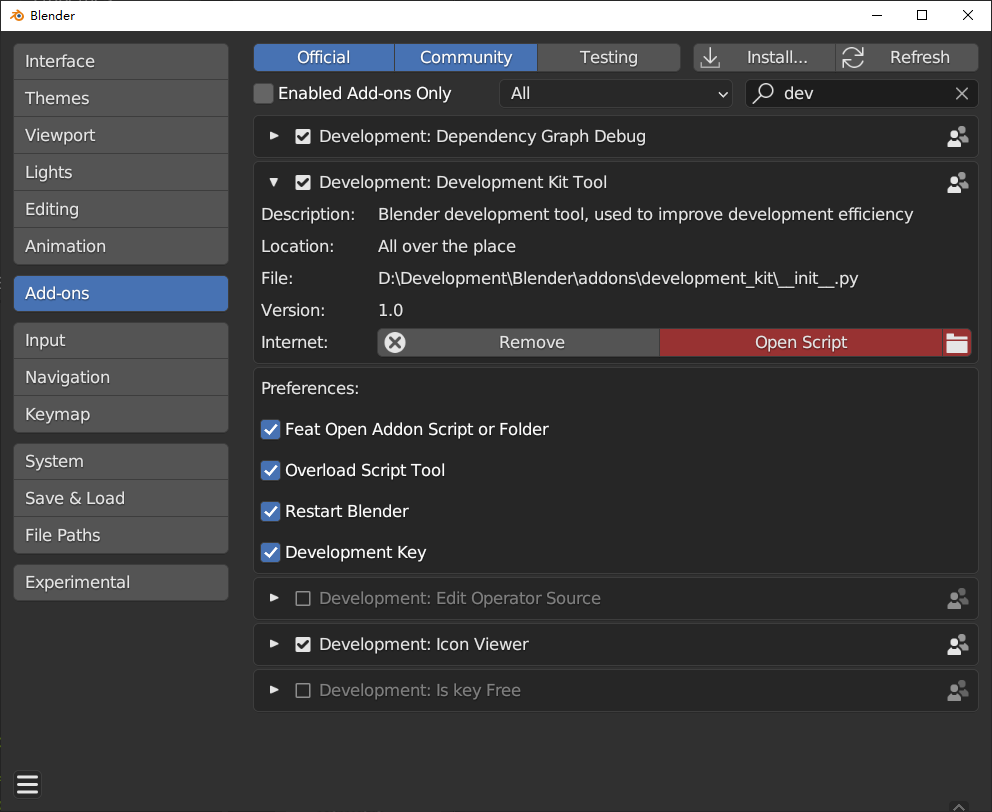
The add-on changes how Blender draws the add-on section so the expanded entry can show options for opening a script or its folder. Choose the script to open it with the default program, or open the folder directly.
Reload or restart Blender
The listing names a ReLoad Script Tool and a restart control with several click and modifier-key options:
Leftopens a new Blender instance.Alt+Leftprompts you to save before restarting Blender.Ctrl+Leftrestarts without a save prompt, so save your work first if needed.Shift+Leftopens two Blender instances.Ctrl+Alt+Shift+Leftis labeled “Loop Open Blender.” The listing describes it as “dedicated for explosion,” but does not explain that wording further.
Other development shortcuts
Development Kit Tool also lists shortcuts for several Blender commands:
Alt+Spacetoggles full screen.Ctrl+Alt+MiddleMouseshows the console.Ctrl+Alt+RightMouseswitches the user translate interface.Ctrl+Alt+AccentGravesaves the Home file.
Fit and compatibility
They may suit developers who often open add-on files, reload scripts, or restart Blender during development.
The product is an add-on marked as Blender Extension Compatible. Its listed Blender versions are 4.0, 3.6, 3.5, 3.4, 3.3, 3.2, 3.1, and 3.0. The listing does not specify compatibility with versions beyond that range.
Superhive marks the add-on as free, while the creator notes that it can also be purchased to support the work. The listing identifies the license as MIT and links to the project repository. Check the product listing and repository for current details.