E3D Bridge is a Blender add-on for preparing scene geometry and supported image-based materials for Element 3D in After Effects. It exports an OBJ, an MTL material file, a textures folder and report.txt inside an _e3d folder next to the .blend file. The Blender Extensions listing identifies version 0.3.2 as compatible with Blender 4.2 and newer.
What the export handles
E3D Bridge writes the material properties Element 3D reads, including diffuse, specular, glossiness, normal, opacity and illumination. It converts supported Principled BSDF image textures to those slots automatically:
- Roughness maps become glossiness maps, and metallic maps become specular maps.
- Bump height maps become normal maps, while alpha is extracted for opacity.
- Coat, sheen and other channels Element 3D cannot use are dropped with a warning.
- Texture paths are relative and sanitized. Textures are deduplicated, resized to a maximum size, and saved as JPG for color maps or PNG for data maps.
The exporter also applies modifiers, converts curves and text to meshes, and expands linked collection instances. Hidden or excluded objects are skipped. The report describes materials that were processed or skipped and lists warnings, including when a scene is unusually large.
Decimation and part rules
For large CAD meshes, smart decimation can reduce geometry to a triangle budget. Rules let you preserve selected parts in greater detail while simplifying the rest. Default keywords cover props, gimbals, cameras and lenses; you can add keywords for parts named differently in your scene.
Parts matching a rule receive their own prefix and materials. In Element 3D, that separation lets you hide, spin or aim those parts with groups. Review the export report to see how the add-on handled the scene and its materials.
Exporting to Element 3D
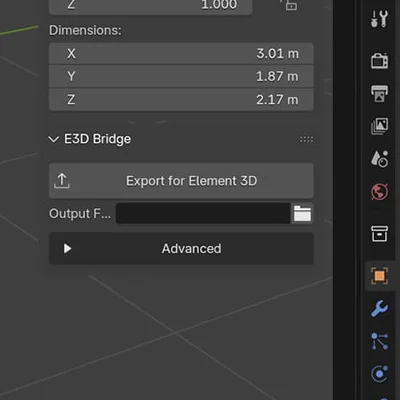
- In Blender's 3D Viewport, press N and open the E3D Bridge tab.
- Click “Export for Element 3D.” The add-on creates the
_e3dfolder next to your.blendfile. - In After Effects, open Element 3D's Scene Setup, choose Import and select the exported OBJ.
For installation from a downloaded file, follow Blender's Install from Disk instructions.
Material limits and release details
Fully procedural materials, including noise textures, mix shaders and glass, currently export as flat gray. report.txt identifies each affected material. The Blender Extensions listing identifies Cycles baking as planned for a future release.
Version 0.3.2 is listed as free and open source under GPL-3.0-or-later. Its Files permission covers writing OBJ, MTL, texture and report files to the export folder. The developer's issue tracker is the place to report problems.