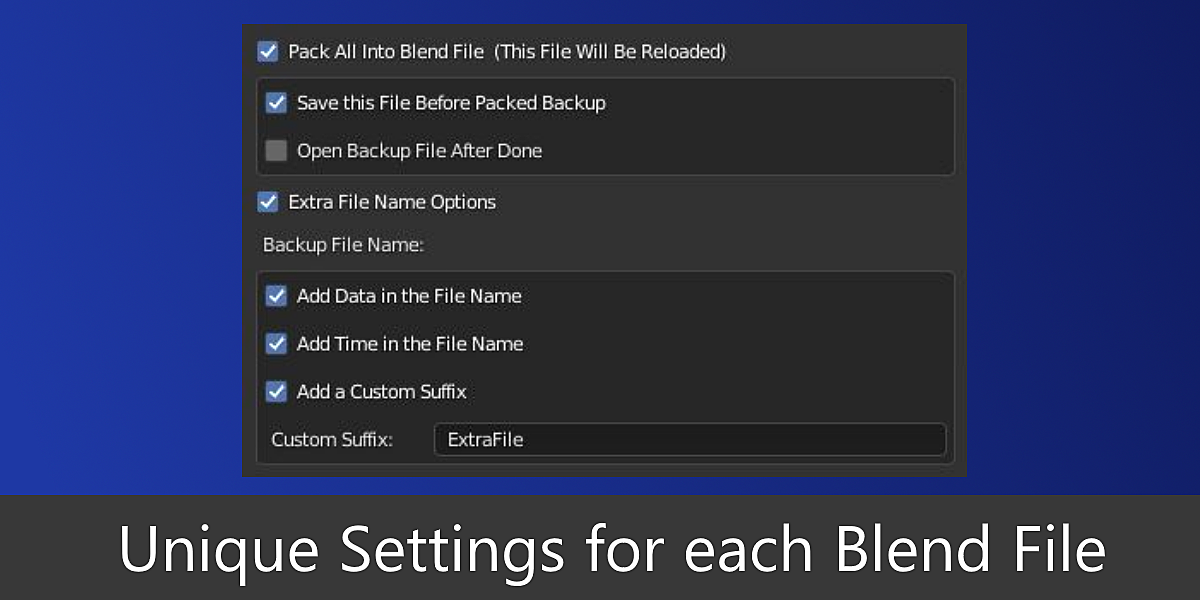
Easybackup is a Blender addon for saving a project backup to another folder with one click. Set up its options for a blend file, then use the backup button or available shortcut when you want a copy. The addon keeps its settings in that blend file, so each project can have its own destination and naming choices.
Set a destination for each project
The Default Path method uses a folder set in the addon preferences, which can give several projects one shared backup location. With Custom Path, you can choose a different directory for a project. The developer also describes creating folders for individual files under the default path.
Easybackup accepts folders on your computer as backup destinations, including cloud folders such as OneDrive.
What each backup contains
The backup can include packed textures. You can add the date, time, and a custom suffix to its filename. If a backup with the same name already exists, Easybackup duplicates the file, and the interface records when you last backed up the project.
CGoutset's FAQ says packing applies to the backup file; the original blend file remains unchanged. This lets you create a copy with its textures packed while continuing from the original project.
Check compatibility before installing
The product listing names Blender versions 2.83, 2.9, 2.91, 2.92, 2.93, 3.0, 3.1, and 3.2. Check with CGoutset before relying on compatibility with a later release. The documentation says Easybackup was tested only on Windows and that some features may not work properly on other operating systems. The listing identifies the license as GPL.
The product materials describe backups started with a button or shortcut; they do not describe a scheduled background backup. Review the Easybackup product listing and its FAQ for current details.