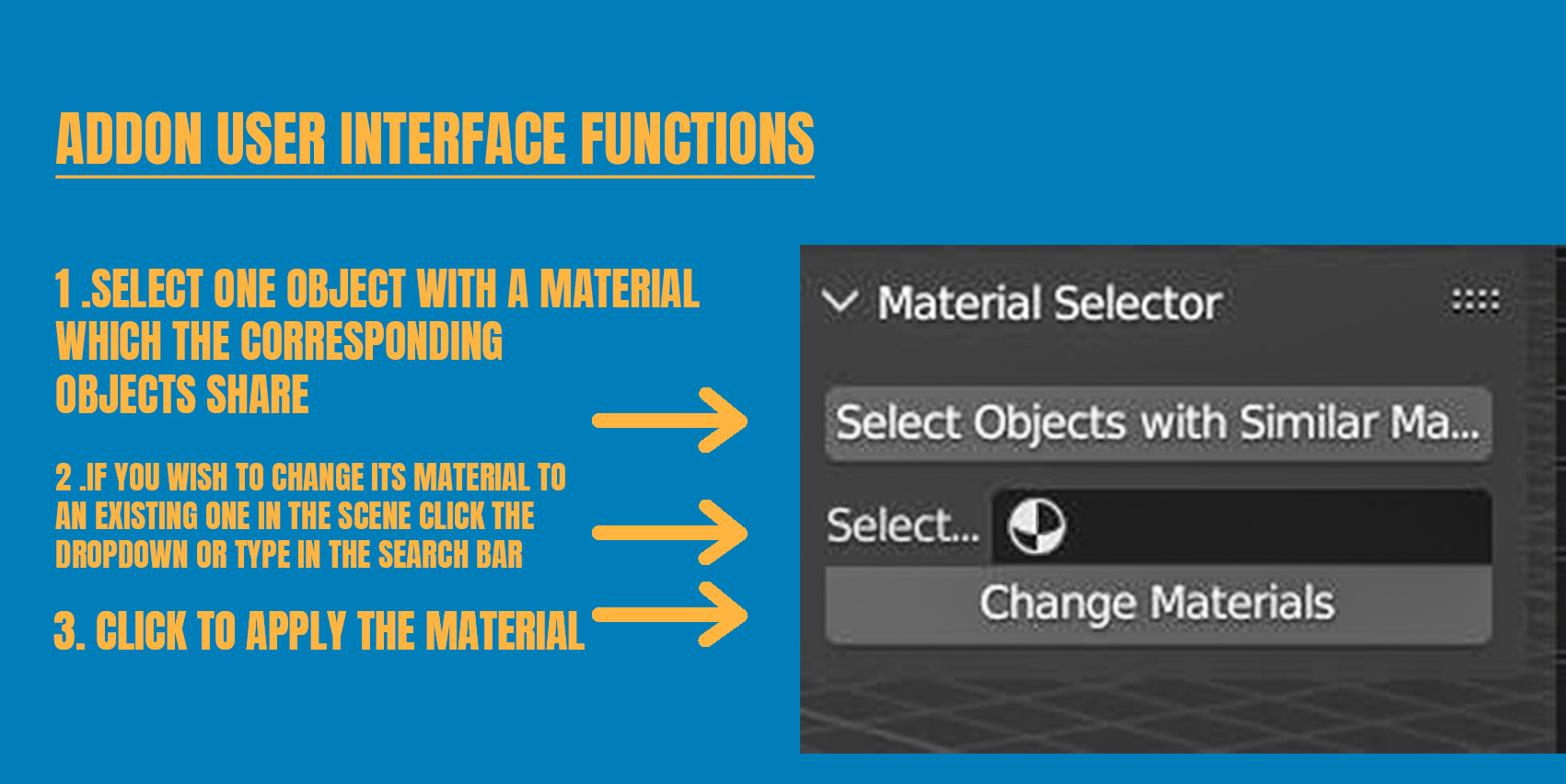
MatSelector is a Blender add-on for selecting scene objects that share a material. Choose an object with the target material and click Select Similar. You can then change the selected objects to another material, move them into a collection, or use them for keyframing or animation.
When MatSelector can help
The add-on is aimed at scenes where related objects are difficult to select individually. For example, an imported scene may contain many ungrouped objects, or a building may have repeated windows whose material needs changing. Selecting by shared material can make those edits quicker and reduce the chance of misclicking objects one at a time.
How the material workflow works
- Select an object that has the material you want to target.
- Use Select Similar in the add-on panel to select objects sharing that material.
- Change the selected objects to a chosen material, or move them into a collection.
The workflow starts from an object and its assigned material. The product listing identifies a limitation: MatSelector does not handle a material applied to a face within an object that has a different material. If your scene depends on per-face material assignments, check the product listing before relying on the add-on.
Compatibility and license
The listing names Blender versions 3.0 through 3.5 and identifies the license as GPL. AnyPlugins lists MatSelector as free; check the linked product listing for current availability and terms, especially if you use a later Blender version.