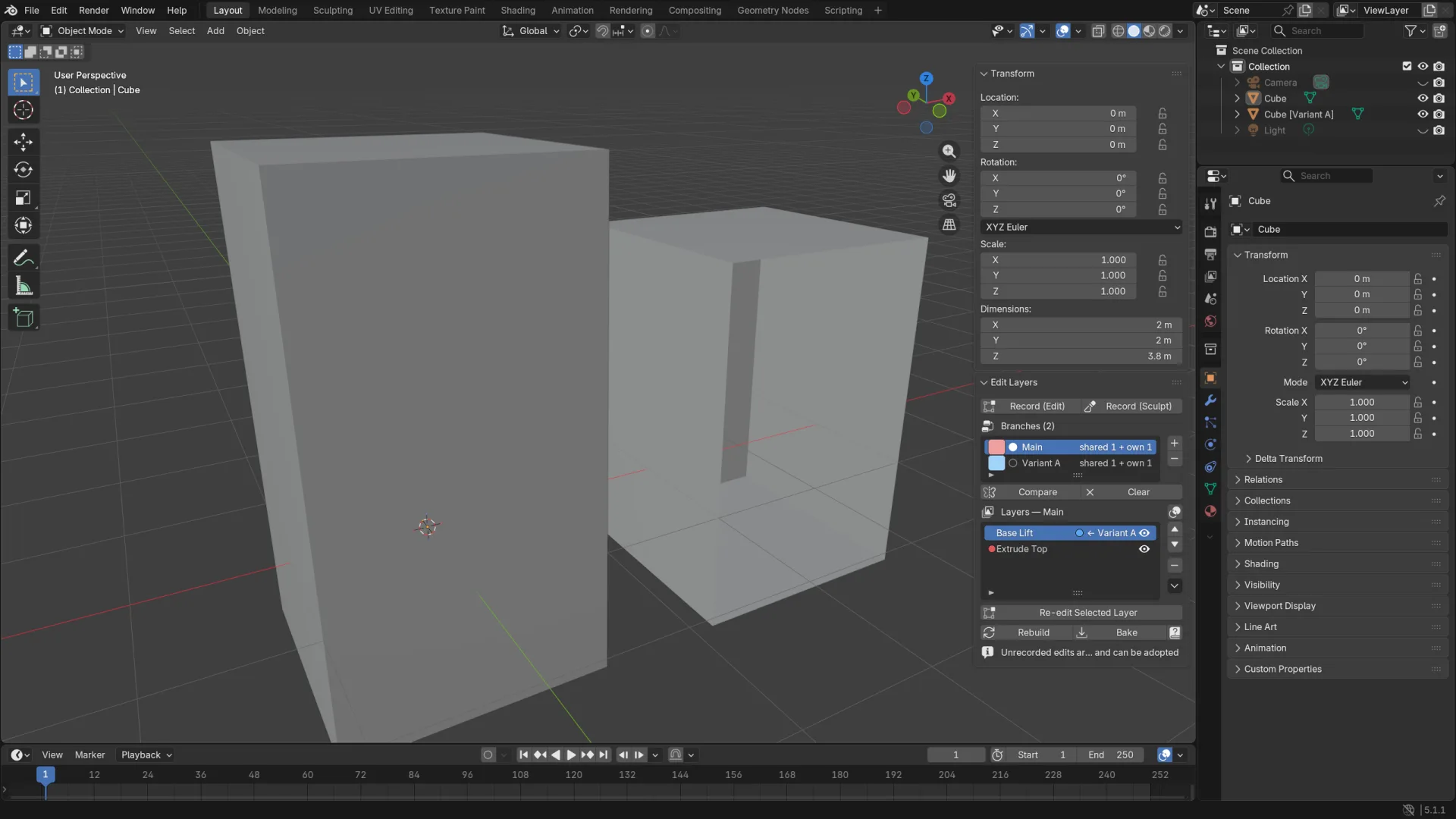
Edit Layers is a Blender add-on that records manual mesh modeling as a stack of layers. You can toggle a layer, change its order, reopen it for editing, or branch from it to compare another version. It appears in the 3D Viewport sidebar under the Edit Layers tab; press N to open the sidebar. The Blender Extensions listing records version 1.0.1 and Blender 5.0.0 as the minimum requirement.
Recording a modeling session
Select a mesh and choose Initialize Stack. Start recording with Record (Edit) or Record (Sculpt), then use Blender’s standard tools. Edit and Sculpt Mode operations can be recorded in the same session. Press Commit to save the session as one layer. Bake applies the result to the mesh and removes the stack.
The layer list works from top to bottom: the first layer is at the top and the newest is at the bottom. Toggle a layer’s visibility to rebuild the mesh without it, use the controls to reorder or delete layers, or use Re-edit Selected Layer to edit a layer in the middle of the stack. Enable the overlay icon at the right of the layer list header to highlight the selected layer’s affected vertices in the viewport: moved vertices appear orange and created vertices green.
Branching to compare options
Create a branch from any layer, then add new commits to that branch while the shared earlier layers remain in place. Select a branch to switch between versions. Compare places the other branches beside the object as duplicates, which makes shape changes easier to inspect.
Re-editing a shared upstream layer propagates to every branch that uses it. Edit Layers blocks deletion of shared layers and reordering across a shared layer when those changes could affect other branches.
What the stack records
Edit Layers records vertex moves and topology changes such as extruding, beveling, subdividing, using the knife tool, and deleting geometry. It also records material assignments, smooth or flat shading, seams, sharp edges, creases, and bevel weights. New geometry is stored relative to nearby anchor vertices, so it can follow upstream mesh changes. Anchor following covers translation; offsets do not rotate with upstream rotation or scale.
Limitations to know
- UVs, vertex colors, and multiresolution modifier displacement are not recorded.
- Sculpt Dyntopo and remeshing replace the topology and can create very large layers.
- Shape keys cannot be used with an active stack. A mesh with shape keys cannot be initialized, and adding shape keys while a stack is active is reverted. Finish the modeling work and bake the stack before creating shape keys.
- Closing Blender during a recording loses that uncommitted session. Committed layers are saved in the .blend file.
Recovering an edit made outside recording
Edit Layers can detect edits made without recording when they follow a rebuild in the current session. Choose Adopt as a Layer to save those changes. An edit made immediately after reopening a file is not detected automatically, though manual adoption still works. While unrecorded edits remain, Edit Layers blocks operations that would wipe them, such as recording, reordering, or baking. Those edits are discarded only when you choose Discard and Rebuild. The project README covers the recording workflow, branches, and other limits.