GrimTopo Free is a Blender add-on for drawing retopology over a sculpt. Its tools help you build and adjust surface-following quad meshes with strips, patches and hole filling. The Blender Extensions listing identifies version 1.2.0 and Blender 4.2.0 or later as the minimum version.
Build a retopo mesh over a sculpt
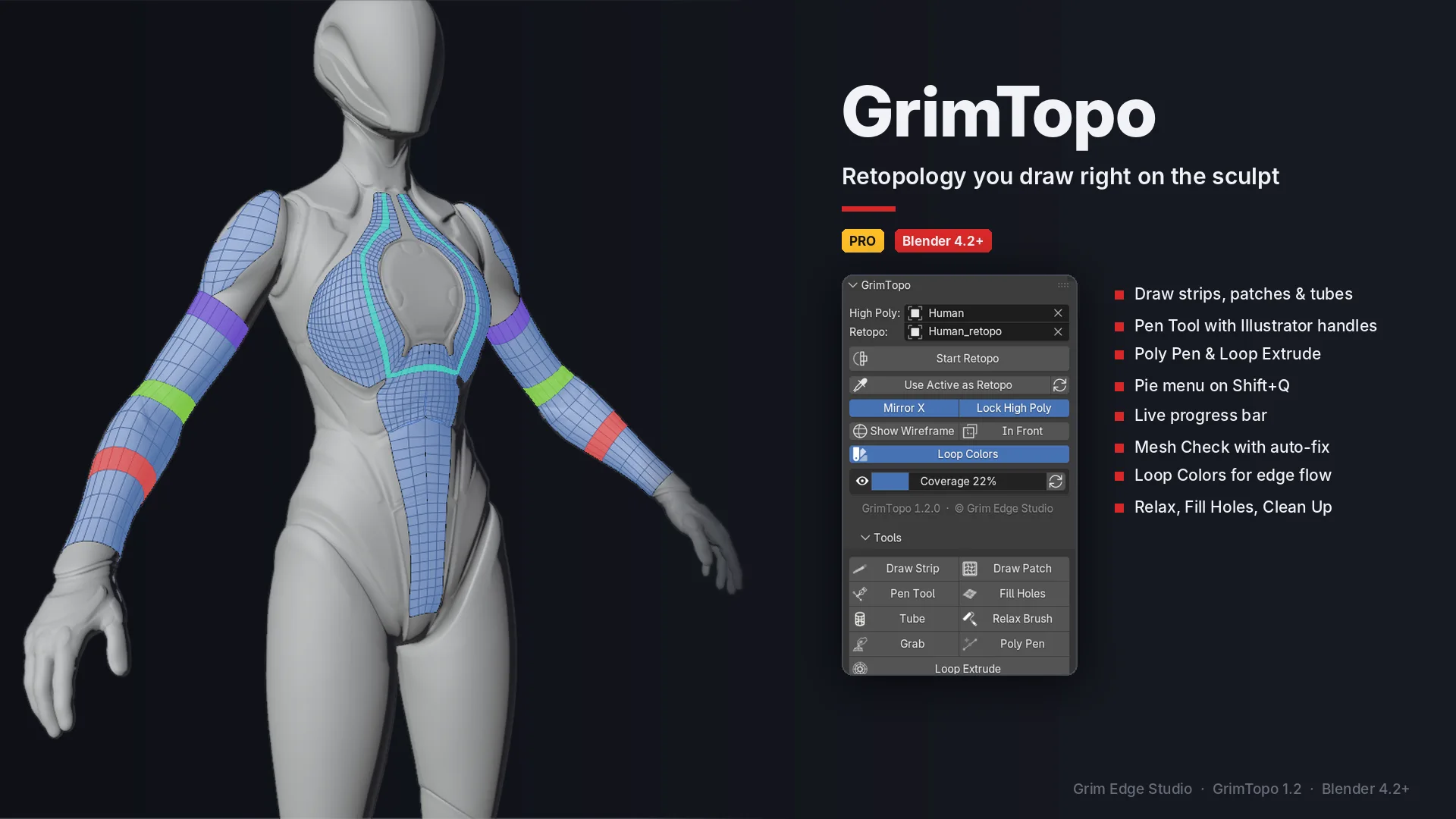
Start Retopo creates a retopology mesh, locks it to the sculpt and sets up mirror and snapping. A progress indicator tracks how much of the model the retopo covers; the 1.2.0 notes also list the quad count and milestone callouts.
- Draw Strip lays down edge flow as you drag across the surface. The listing gives loops around the eyes and mouth, and strips along limbs, as examples.
- Draw Patch lets you draw a patch on the high-poly model.
- Fill Holes fills openings in the retopology mesh. Grab moves vertices over the sculpt and merges them only when dropped directly on another vertex; Relax is also included.
- Bigger / Smaller Quads changes patch density. Hold the middle mouse button and scroll; the listing says the patch keeps its shape and stays on the surface.
The tools are available in the GrimTopo panel in Blender's N-panel. The Shift+Q pie menu is listed as a GrimTopo Pro feature.
Check and refine the mesh
Mesh Check identifies problems such as holes, loose vertices or edges, non-manifold edges, n-gons, twisted faces and triangles. The 1.2.0 notes describe controls to select and fix issues. The free edition includes Mesh Check, while color-coded issue display and automatic overlap repair are listed under Pro.
GrimTopo Free also includes Clean Up, Pinned Edges and Loop Colors. Loop Colors tints the retopo mesh and marks its main flow loops, including the mirrored side. For another editing approach, GrimTopo Pro adds the Pen Tool, Poly Pen, Loop Extrude, Tube, Relax Brush and Auto Head.
Version, compatibility and installation
The Blender Extensions catalog lists GrimTopo Free 1.2.0 under the GNU General Public License version 3.0 or later. Its declared file permission is for saving and loading retopology head templates. GES is the listed maintainer.
To install, download the add-on ZIP and choose Edit > Preferences > Get Extensions > Install from Disk in Blender. After installation, open the N-panel and select GrimTopo. See the GrimTopo Free listing for the version details and the Blender manual's Install from Disk instructions.