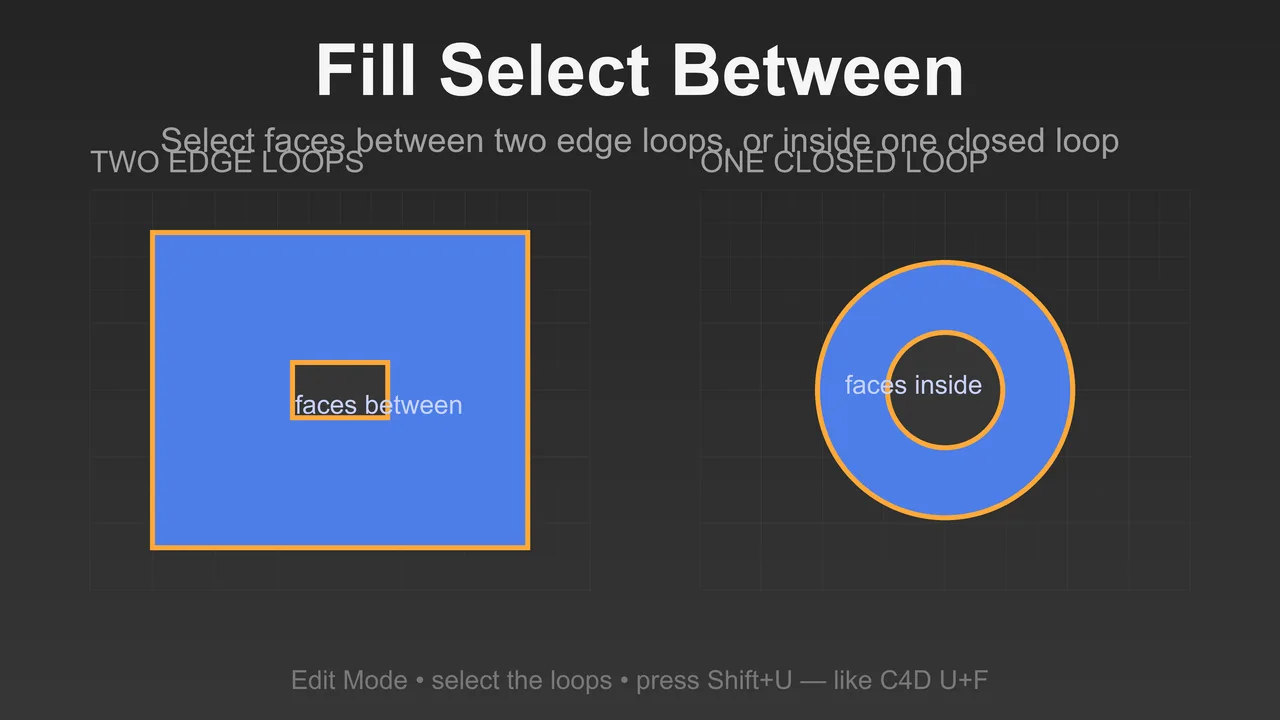
Fill Select Between is a Blender add-on for selecting mesh faces by their boundaries. Choose two edge loops to select the faces between them, or one closed loop to select the faces it encloses. A third option selects the enclosed region under your cursor.
Choose a face selection method
- Select two edge loops to select the strip of faces between them.
- Select one closed loop to select the faces inside it.
- For cursor-position fill, hover over a region inside a closed boundary and press Shift+Q.
The add-on works in Edit Mode and Weight Paint Mode. Its interface is English by default and uses Simplified Chinese when Blender's interface language is set to Simplified Chinese.
Modes and installation
Fill Select Between requires Blender 4.2 or later. Its Extensions listing identifies Blender 4.2, 4.5, 5.0 and 5.1 as verified versions. The listing offers drag-and-drop installation or installation from disk. For the latter, see Blender's Install from Disk instructions. To change the shortcut, search for the add-on in Edit > Preferences > Keymap.