Label mesh faces in Blender
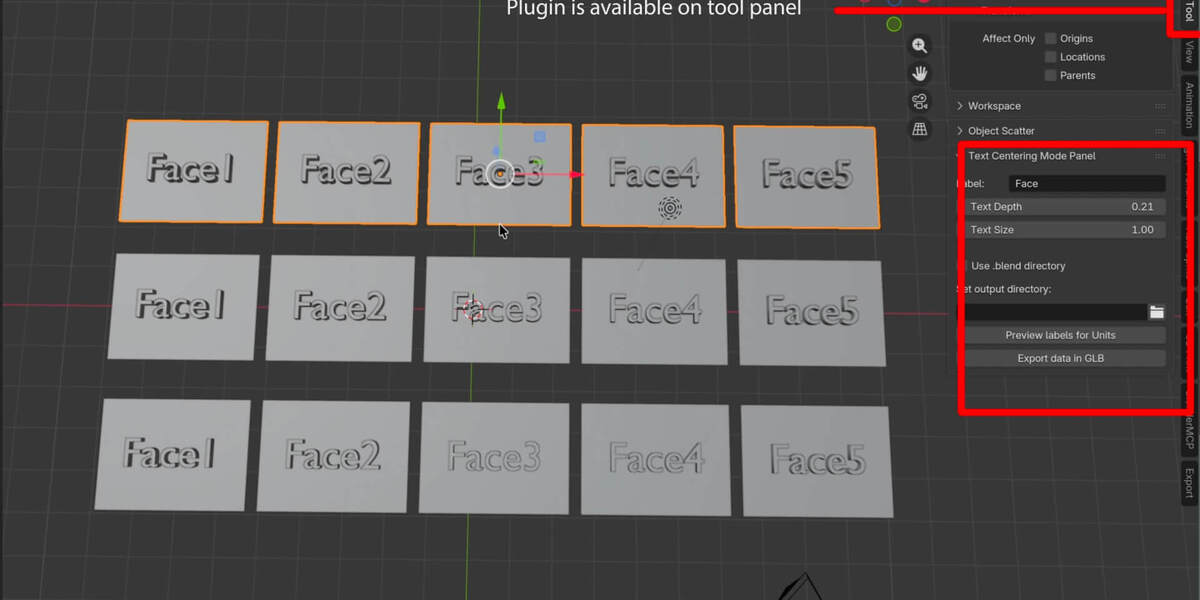
Face Tag creates a centered 3D text label on every face of a mesh to identify faces in architectural visualization, real estate and game asset pipelines. Each label faces outward along its face normal. Select one or more mesh objects in the viewport and preview the labels; Face Tag stores them in a separate Labels_[ObjectName] collection that you can regenerate.
Set the label text and placement
Choose a base label, text size and extrusion depth. For example, the documentation uses “Face” as a base name for labels such as Face1 and Face2. Labels sit slightly in front of each face, by 0.01 units, to help avoid z-fighting. The documentation also says triangulated faces are merged into quads before labeling.
Export the labeled object
After previewing the labels, select the main mesh object or asset root and use the GLB export controls. The exported file includes the mesh, its children and the generated label objects. You can save beside the .blend file or choose another output folder. The separate labels collection can be hidden or deleted without changing the original mesh.
Compatibility and license details
The Superhive listing shows Blender versions 4.3–5.0 and lists Cycles and Eevee as render engines used. The documentation says Blender 4.3.0 or later. The listing identifies the license as GPL, while the documentation describes single-user commercial use and says redistribution is not permitted. Confirm the applicable terms with bhdesign before relying on either statement.