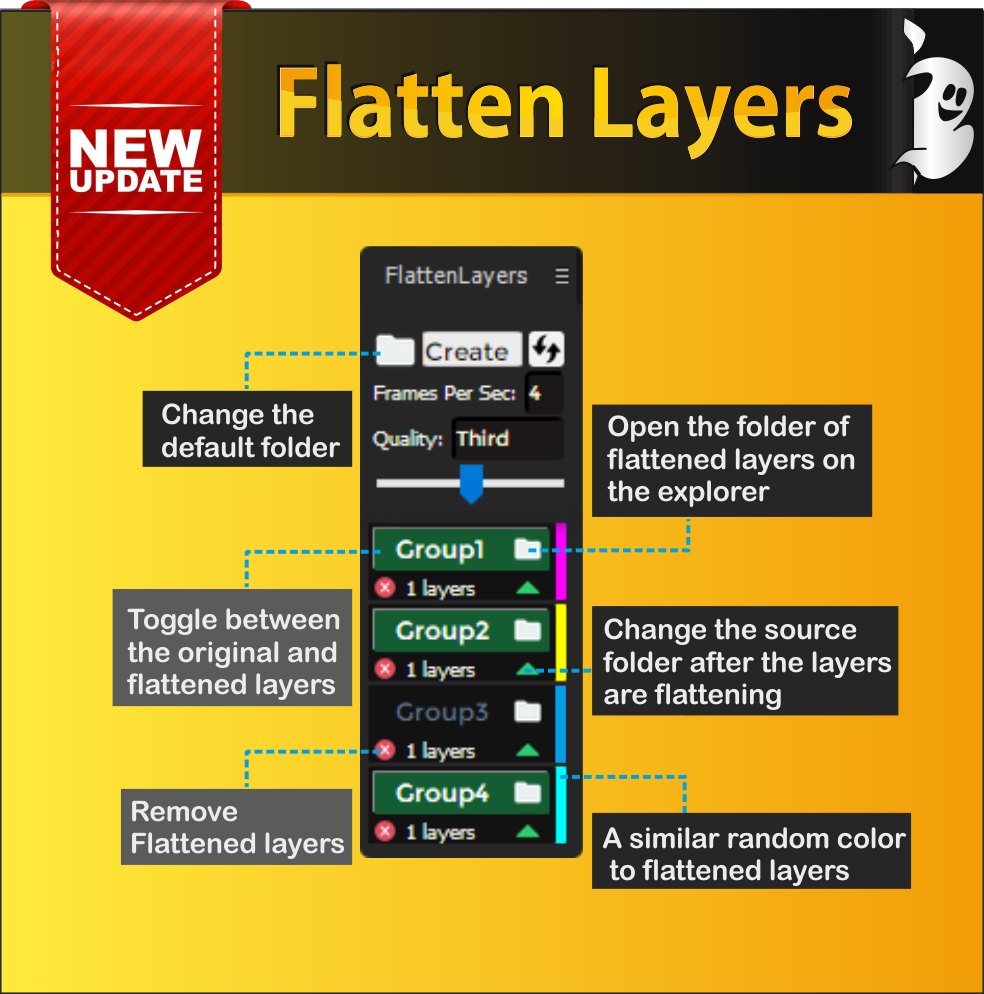
Flatten Layers 2 reduces selected After Effects timeline layers to one flattened layer represented by a lossless PNG sequence, without a separate pre-render step. It is intended for layer-heavy compositions where the source stack is useful during editing but cumbersome to keep expanded in the timeline.
How the workflow works
Select the layers, set a frame rate and quality, then click Create. Flatten Layers 2 generates the PNG sequence in the background, so you can continue working while it runs. You can toggle between the flattened result and the original, unflattened layers.
When it fits
Use it to simplify a crowded timeline while keeping access to the original layer setup. The flattened result is a PNG sequence, rather than a consolidated stack of separately editable After Effects layers. Switch back to the unflattened layers when you need to adjust their individual properties. The product EULA bars installation or use on more than one computer at a time; multi-user or multiple-copy use requires an appropriate license for each user and copy.
Compatibility
The product listing names After Effects 2026, 2025, 2024, 2023, 2022, 2021, 2020, CC 2019, CC 2018, CC 2017, CC 2015.3 and CC 2015 as compatible versions.