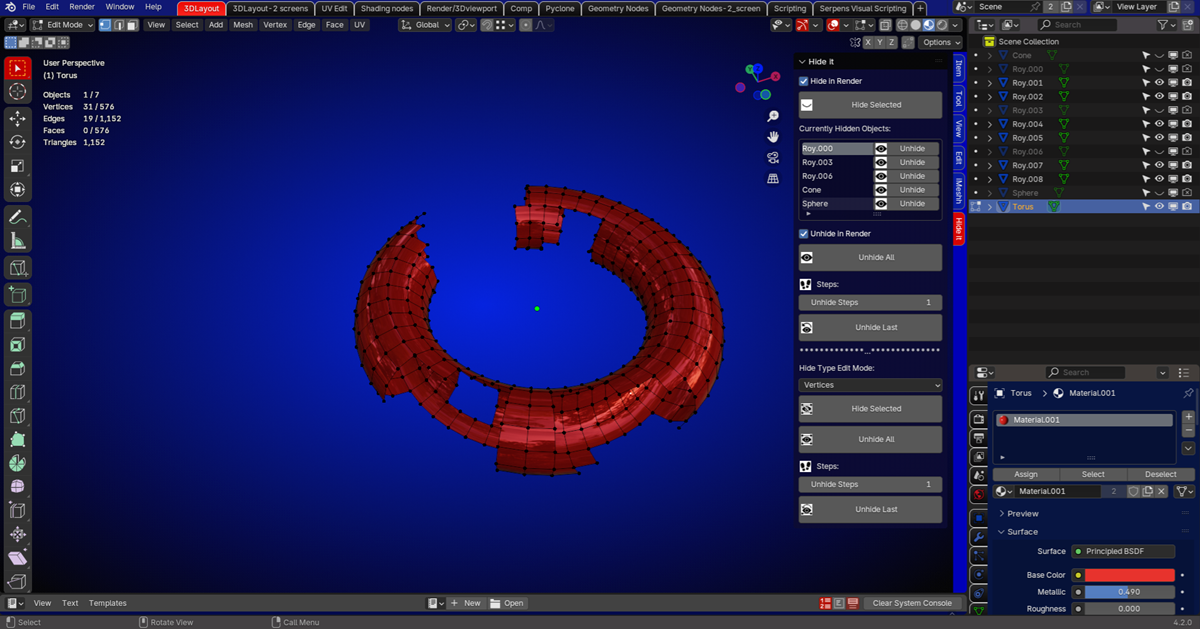
Hide It by KVD is a Blender add-on for hiding and restoring objects and mesh components through a panel. Hidden objects appear in a list, where you can bring them back individually. The panel works alongside Blender’s H key and the Outliner’s eye icon.
Hide and restore objects
Select one or more objects and choose Hide selected. Hide It lists them under Currently hidden objects, with a control beside each entry to restore that object. Unhide all reveals every hidden object, including objects hidden through the Outliner.
Unhide last restores objects in the reverse order they were hidden. Set Unhide steps to choose how many objects to restore at once; you can change the number at any time. The same reverse-order behavior applies to objects hidden through the panel or the Outliner.
Viewport visibility and rendering
A panel checkbox can also keep applicable hidden objects out of renders. The documentation notes an exception: objects hidden with H remain visible in the render. When render restoration is enabled, unhiding an object returns it to both the viewport and the render.
Hide mesh components
For mesh editing, choose vertices, edges, or faces from the panel dropdown. Blender enters Edit Mode so you can select the geometry to hide. Use Hide selected or H to hide the selection. Unhide last restores geometry according to the selected step count, while Unhide all reveals it at once.
Material selection and compatibility
Version 1.1 added a way to hide mesh objects by selecting their material in the panel. Superhive marks Hide It as Blender Extension Compatible and lists Blender 2.92, 2.93, 3.0 through 3.6, and 4.0 through 4.4. The listing identifies the license as GPL. Check the product listing for its compatibility details and the developer documentation for usage instructions.