Import-Export 3D Manufacturing File (.3Mf) is a Blender add-on for importing and exporting 3D Manufacturing Format (3MF) files in a 3D printing workflow. It preserves model hierarchy and transformations on import, then lets you export selected objects or a whole scene. Check the seller’s product page for Blender version details, and the FAQ for supported slicers.
Importing 3MF models
The add-on organizes imported objects into Blender collections and handles components and object transformations. You can optionally merge all imported objects into a single mesh. Import handles 3MF namespaces for compatibility, resolves component references, supports transform matrices, and preserves vertex and triangle data.
Exporting from Blender
Export either the selected objects or the entire scene, with an option to apply modifiers. The exporter uses world-space coordinates to preserve position and scale, generates the 3MF XML structure, and handles relationships and content types.
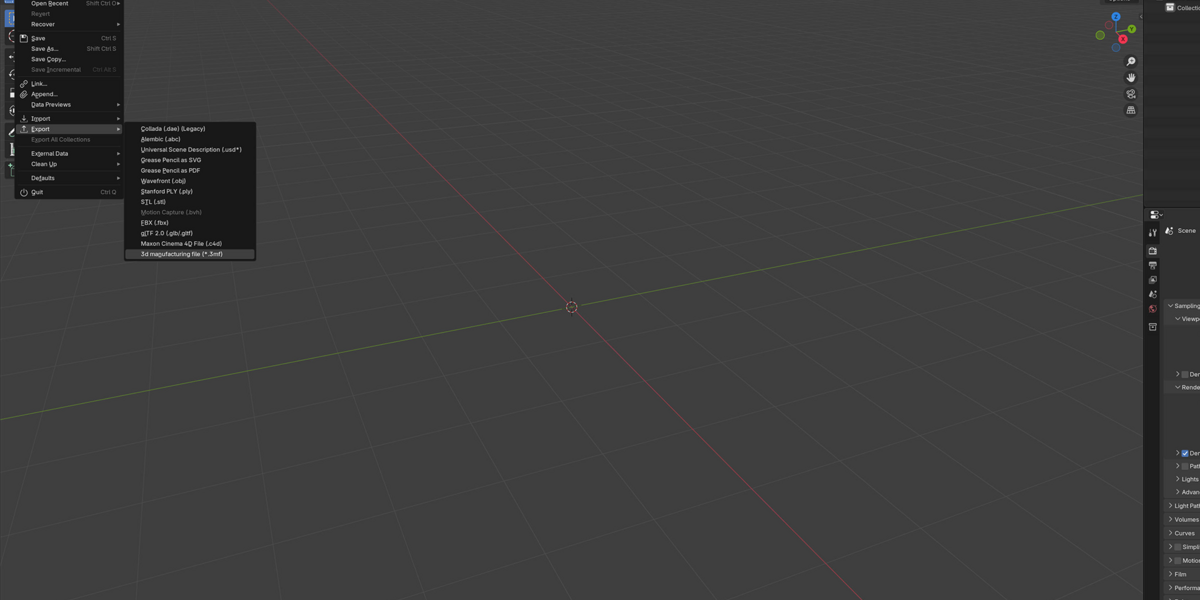
In Blender, the documented menu paths are File > Import > 3D Manufacturing File (*.3mf) and File > Export > 3D Manufacturing File (*.3mf). Bambu Studio, OrcaSlicer, PrusaSlicer, and Cura open its standard 3MF exports without conversion, according to the seller’s FAQ.
Setup and compatibility
The product overview lists Blender 3.0 or newer, while the listing details give Blender 3.6 through 5.2; check the current listing for the release you use. The add-on supports Windows, macOS, and Linux and requires a 64-bit operating system. To install it, open Blender Preferences, install it through the Add-ons section, then enable it.