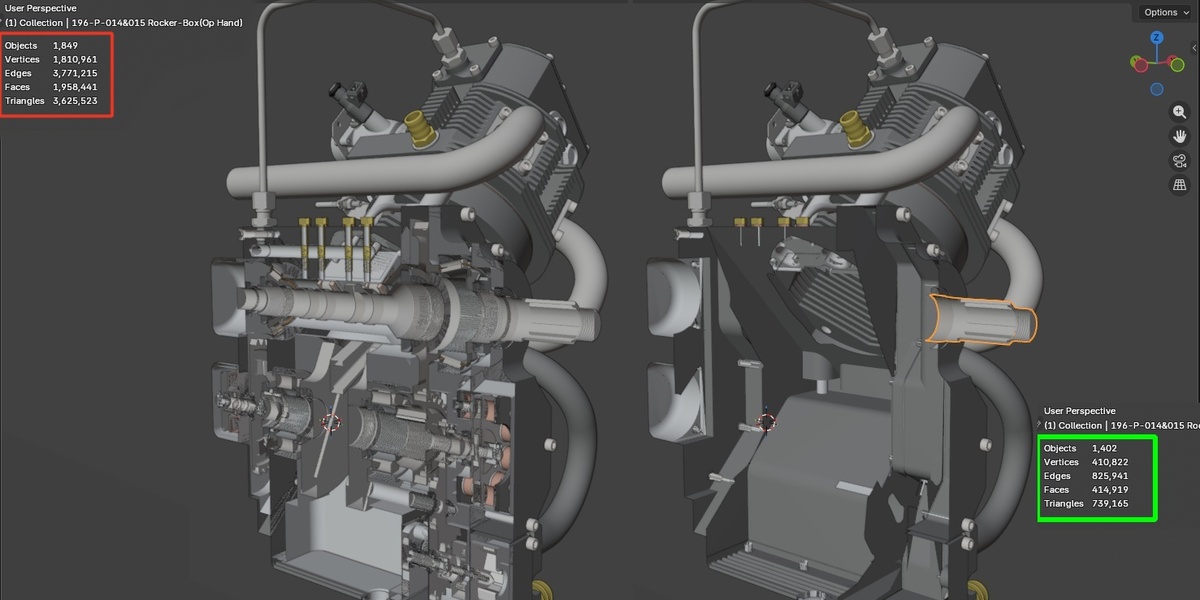
insideOUT is a Blender add-on for removing fully enclosed objects and faces that cannot be seen from outside a mesh. It uses visibility ray casting, then deletes the hidden geometry without remeshing the visible surface. That makes it useful for dense CAD imports, archviz scenes and game assets with internal parts that do not need to reach the render or export.
Remove hidden geometry without remeshing
The cleanup runs in two passes: first, it removes objects with no visible faces; then it removes hidden faces from the remaining meshes. Surviving faces keep their topology, UVs, normals and material assignments. The add-on does not decimate or rebuild the model.
For an assembly, select its objects and use Clean Up: Objects, then Faces. The add-on removes fully hidden objects before checking the faces left behind. Select buttons beside the delete actions let you inspect the proposed objects or faces before removal.
Settings for assemblies and narrow gaps
Mode controls how selected objects occlude one another. Optimize Selected Together is suited to assemblies, while Optimize Each Object Alone processes separate assets independently. Optimize Active Only cleans the active object while the other selected objects provide occlusion.
Gap Tolerance is 0.1 mm by default. It treats hairline seams between parts as closed, so rays do not pass through a tiny crack and leave interior fragments behind. A real slot narrower than the tolerance can also be treated as hidden; lower the tolerance or set it to zero when that opening needs to remain visible.
Ignore Transparent Materials is on by default. Recognized glass and transparent material faces neither hide what is behind them nor get deleted. Detection is heuristic, so check the material setup if a transparent material is not recognized. Advanced settings include ray count and optional cleanup for small leftover islands.
Where the cleanup can help
CAD imports from formats such as STEP, IGES and IFC can contain fasteners, brackets or other parts sealed inside an assembly. Archviz scenes may have furniture or components behind closed walls, and game meshes can carry interior faces into an export. Removing geometry that cannot be seen may reduce scene weight and the amount of geometry sent through later rendering or export work.
The product listing reports a test on a 22,307-object CAD assembly with 6.9 million triangles: cleanup took 23.7 seconds, removed 21,119 fully hidden objects, and then removed 77% of the remaining faces. These are the developer's reported results for that scene, not a performance estimate for every model. The listing also describes optional NVIDIA CUDA acceleration on Windows x64 and Linux x64; CPU processing is available without CUDA.
Check these limits before running
insideOUT reads base mesh data, so apply modifiers first if their results should be included. Visibility sampling can miss faces at the bottom of an extremely deep, narrow opening; increasing the ray count may help. Open meshes can be processed, but closed geometry gives the tool a clearer outside boundary.
Deletion follows the existing triangulation. It does not cut or rebuild a clean border, so CAD meshes with long, thin triangles can leave ragged edges where faces were removed. The select preview helps you inspect the result before deleting. A run is one Blender undo step and can be restored with Ctrl+Z.
Compatibility and documentation
The product copy describes a Blender 4.2+ extension tested up to Blender 5.2, with builds for Windows x64, Linux x64 and macOS Apple Silicon; the listing's Blender Version field gives Blender 3.6 through 5.2. CUDA is optional on Windows and Linux; the macOS build is CPU-only. The download is a self-contained zip with the runtime included. See the insideOUT 2.0.0 documentation for installation steps and settings, or the product listing for current product details.