Keyframe Offset Master is a Blender add-on by Panim that applies timing offsets across multiple objects or bones. It helps animators create cascading motion without moving each set of keyframes individually.
Shape the timing and sequence
The product listing describes six offset modes, including Linear, Exponential, Ease In/Out, Random, and custom patterns. Ten ordering options determine the sequence, with alphabetical and reverse sorting, position on the X, Y, or Z axis, distance from the origin, active object, or cursor, numeric suffix, and random order.
The add-on works with objects, armatures, and Follow Path constraints. It also includes object mode support and full transform control. These options suit motion graphics, architectural visualization, and character animation where timing needs to cascade across a group.
Apply and reuse an offset
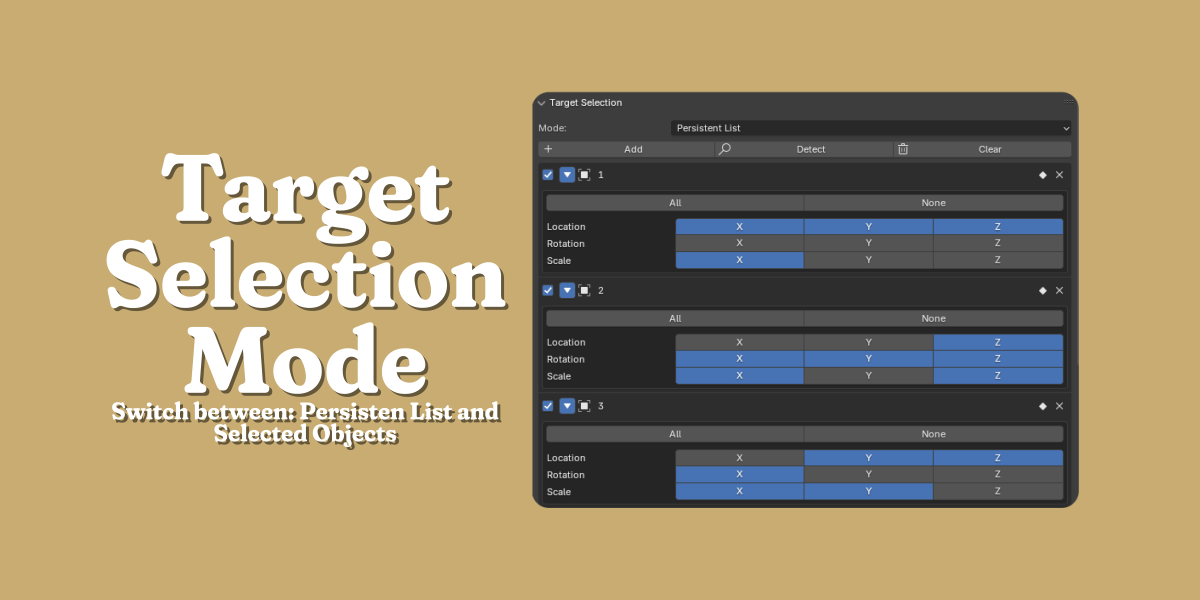
- For object offsets, choose Persistent List to use a predefined object list or Selected Objects to use the current selection; armature offsets require Selected Targets mode.
- Adjust the options under Time & Offset Order.
- Click Apply Offset in the Action panel.
If you want to undo the result, use Reset or choose a saved state in Backup & Restore. The Configuration panel can save settings as a JSON file and load them again later. The product documentation sets out the offset controls.
Compatibility and limits
The product details list Blender 3.3 through 4.5 and give Blender 3.3+ as the requirement. Armature offsetting only works in Selected Targets mode. The add-on has been tested exclusively on Windows, and proper functionality on other operating systems is not guaranteed.
The product listing includes further feature details and examples.