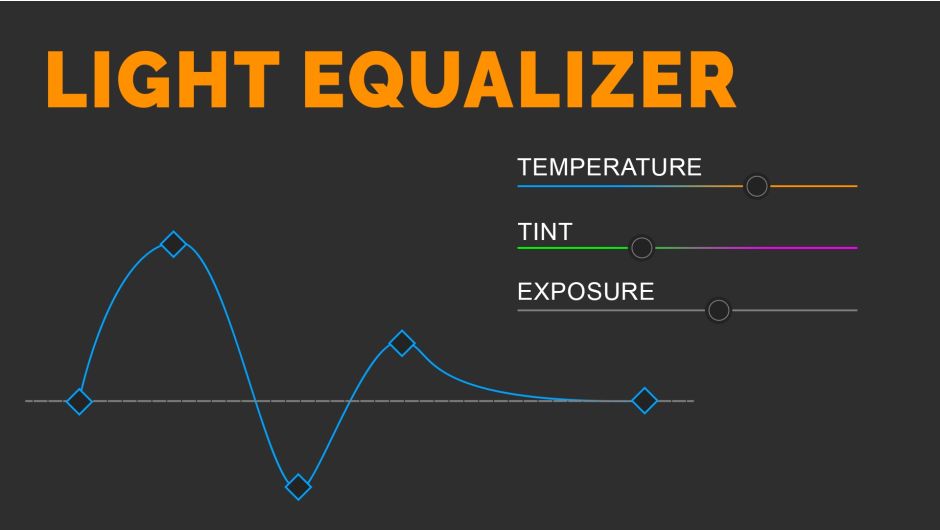
Light Equalizer is a Premiere Pro plugin by Kamil Pekala that analyzes a video clip and sets Lumetri Effect keyframes for exposure, temperature, and tint. It is designed to compensate for brightness and white balance changes within a shot, including changes that can occur when filming outdoors in manual mode as natural light shifts. See the developer’s product listing for current details.
How Light Equalizer works
The plugin analyzes the clip and sets keyframes in Premiere Pro’s Lumetri Effect. It adjusts three properties:
- Exposure for changes in brightness
- Temperature and tint for changes in white balance
Those adjustments are keyframed across the clip, so Light Equalizer is aimed at footage where the lighting or white balance changes over time.
Compatibility and release history
The aescripts listing names Premiere Pro 2020, 2021, 2022, 2023, 2024, and 2025 as compatible versions. Compatibility with later releases is not specified in the supplied listing, so check the developer’s page before installing on a newer version.
Version 1.0.3, dated January 14, 2024, fixed fly-out menu issues. Version 1.0.2 added German, French, Spanish, Italian, Japanese, and Chinese language support.
Who it suits
Light Equalizer is for Premiere Pro editors who need to even out exposure or white balance shifts within a clip.